TrackShip for WooCommerce connects to AST PRO to automatically monitor shipments and push real-time carrier status updates back into WooCommerce — without any manual work after the tracking number is added. Several AST PRO features depend on TrackShip: the Delivered order status, the progress-bar tracker in emails and My Account, live shipment status in the tracking widget, and shipment-status email notifications.
What TrackShip does
- Monitors shipments across 950+ carriers in real time after a tracking number is added in AST PRO.
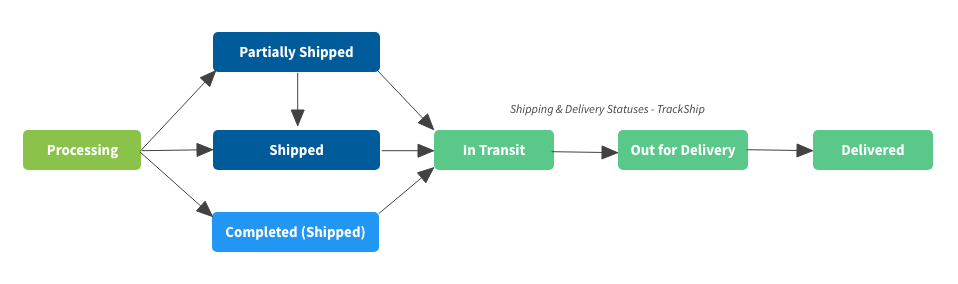
- Updates the WooCommerce order status automatically as the shipment moves — Shipped → In Transit → Out for Delivery → Delivered.
- Triggers AST PRO customer notifications at each stage (email and SMS if SMS for WooCommerce is connected).
- Powers the progress-bar tracker shown in emails and on the My Account order page.
- Syncs the final delivered status to PayPal and Stripe if those integrations are active.
Order status flow
How to connect TrackShip to AST PRO
- 1Install and activate the free TrackShip for WooCommerce plugin from WordPress.org.
- 2Create a free account at trackship.com.
- 3In your WordPress admin, go to WooCommerce → TrackShip and connect your TrackShip account using your API key.
- 4In AST PRO, go to WooCommerce → Shipment Tracking → Order Statuses & Notifications and enable the Delivered order status so TrackShip can set it when a package is confirmed delivered.
- 5(Optional) In the Email Customizer, set the Tracker type to Progress Bar or Icons — these display live carrier events and require TrackShip to populate.
Features that require TrackShip
- Delivered order status (
wc-delivered) — set automatically when the carrier confirms delivery. See Order Statuses & Notifications. - Progress bar and icon tracker in the email widget and My Account — shows live carrier scan events. See Customize Email Notifications & Tracking Widget.
- Display shipment status beneath the tracker widget — shows the current carrier event text (e.g. “Out for delivery”).
- PayPal and Stripe delivered sync — TrackShip triggers the final status update to PayPal/Stripe when delivery is confirmed. See PayPal Tracking and Stripe Tracking.