The Audit Log (under AI Assistant → Audit Log in the left sidebar) records every action taken by an AI assistant — with the result and any error — so you always have a complete, reviewable history. Go to WooCommerce → Shipment Tracking → AI Assistant → Audit Log.
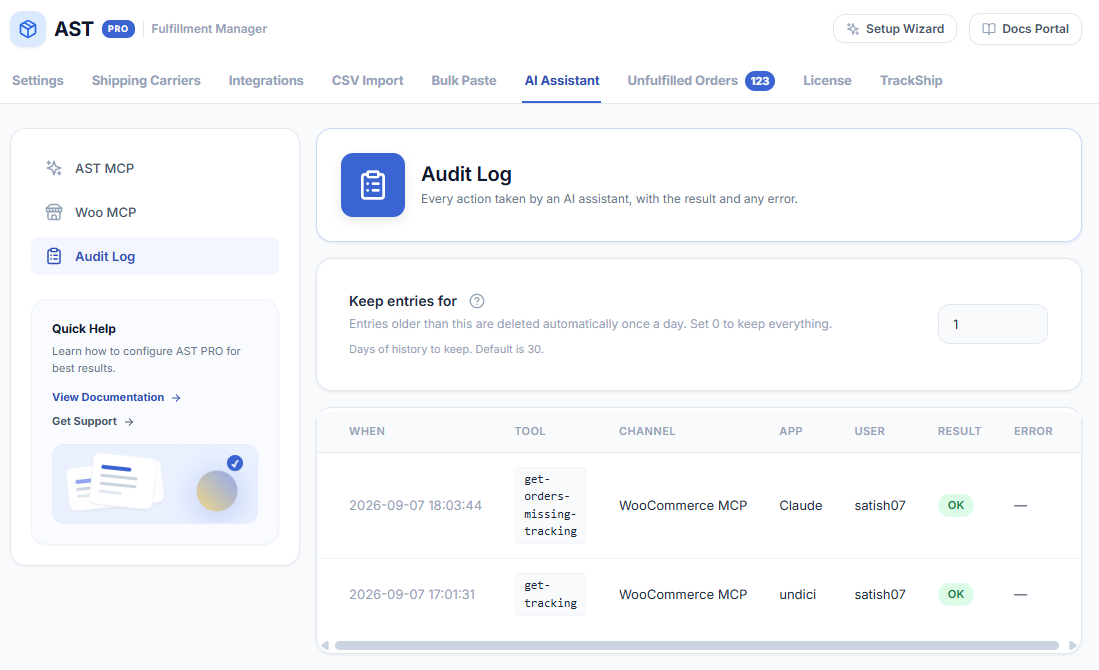
What each column means
- When — the date and time the action ran (displayed in your store’s timezone).
- Tool — the action called, shown as a code name (for example,
get-orders-missing-trackingoradd-tracking). - Channel — which connection route was used: Your link (Connection URL) or WooCommerce MCP.
- App — the AI client that made the request (for example, Claude, claude-code, or cursor-vscode).
- User — the store account the assistant was acting as (shown as the WordPress username).
- Result — OK means the tool ran and returned data successfully. Refused means the call reached the plugin but was blocked or failed — check the Error column for the reason.
- Error — the reason when a call did not succeed. Hover over a truncated entry to see the full message.
Searching and filtering
Use the search box at the top of the log to filter by tool name, app, channel, or username. The log table is paginated — use the page controls at the bottom to navigate older entries.
Retention and storage
At the top of the Audit Log screen is a Keep entries for field (default: 30 days). Entries older than this are deleted automatically once a day via WP-Cron. On low-traffic sites WP-Cron may fire late — if you need reliable cleanup, set up a server-level cron job.
Set it to 0 to keep all entries indefinitely. Be aware that on active stores, indefinite retention can grow the log table significantly over time. Log rows are stored in your WordPress database (wp_posts or a custom table). They are not removed on plugin deactivation — delete entries manually or set a retention window before deactivating if you do not want them kept.
Troubleshooting: log is empty but the AI says it worked
If a tool call appears to succeed in the AI chat but no entry appears in the Audit Log:
- Confirm the AI is connecting via your store’s Connection URL — calls made through a cached or stale endpoint may not reach the current plugin version.
- Check the Keep entries for setting — if it is set very low (for example, 1 day) and the log was viewed just after midnight, entries from earlier that day may already be gone.
- Check that WP-Cron is not deleting entries too aggressively. Temporarily set retention to 0 and repeat the action to see if the entry is written at all.
- If no entry appears after setting retention to 0, the tool call is not reaching the plugin. Use Test my link in Enable & Configure to verify the endpoint is reachable, then check Troubleshooting.