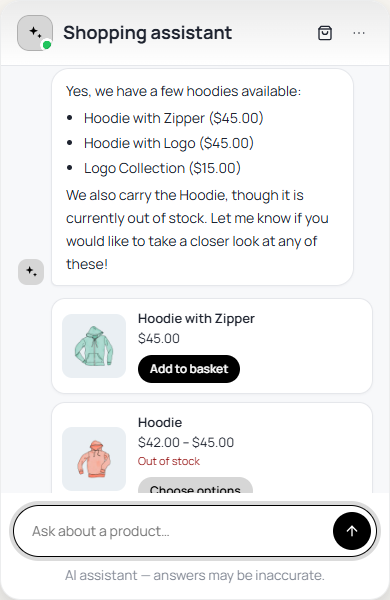
AI Shopping Assistant puts a chat on your WooCommerce shop. Shoppers ask about products, delivery, returns or their own orders, and get answers from your shop’s own information, with product cards they can add to the basket straight from the chat.
What It Does
- Finds products — searches your catalogue, corrects typos, and shows product cards with picture, price and an Add to basket button.
- Fills the basket — adds a product, changes a quantity, removes a line, applies a discount code the shopper already has, and sends them to your own checkout.
- Answers from your shop — returns, delivery and payment questions are answered from your own pages and store settings, never made up.
- Knows where the shopper is — on a product page, “is this one waterproof?” is about that product.
- Order questions — a logged-in customer can ask about their own orders; a guest is asked to log in.
- Returns and exchanges — with Returns for WooCommerce, customers start a return or exchange right in the chat.
- Talk to a person — Email, WhatsApp and contact page buttons when the assistant cannot help.
- Works without AI — with no AI provider it still answers by quoting your shop’s information, understanding questions in seven languages.
- Store assistant — a separate chat for administrators, with read-only store reports.
- Everything on the record — every action either assistant takes, and every one it is refused, is logged with its reason.
Where to Find It
WordPress Admin → AI Shopping AssistantWith your license active, the menu opens on Settings. The tabs across the top are:
| Tab | What it is for |
|---|---|
| Settings | AI provider, limits, knowledge, contact options, saved conversations, privacy and the store assistant. |
| Shopping assistant | Switch the chat on, choose how it looks and where it appears, and edit what shoppers are told. |
| Conversations | What shoppers ask, what went unanswered and what they could not find (when saving is on). |
| Activity | Results over the last 30 days, and every action the assistants took. |
| Status | Whether everything is ready, with diagnostics to copy for support. |
| License | Activate your zorem.com license, see which domain it is used on, and release it to move it to another site. |
Until your license is activated, License is the only tab you will see, and neither assistant runs. Activating it brings everything back exactly as you left it — your settings, conversations and history are never deleted. See Installation & Setup.
Website Brain sits under the same menu, as its own screen. It holds the knowledge both assistants answer from. If you also run AI Agent OS, the Brain lives under that menu instead and both plugins share it.
Next Steps
- Installation & Setup — install the plugin, activate your license and switch the chat on.
- Website Brain — choose the pages the chat answers from.
- Shopping Assistant — choose how the chat looks and where it appears.
- Settings — connect an AI provider and set limits.