When Zorem’s Returns for WooCommerce plugin is active, customers can start a return or exchange and check their requests without leaving the chat. The request goes to Returns for WooCommerce exactly as if it came from its own form, with the same eligibility checks, restocking fee and emails.
Requirements
- Returns for WooCommerce active. For the Pro version, an active licence.
- A logged-in customer. A guest is asked to log in first.
- Exchanges switched on in Returns for WooCommerce, for the Exchange option.
There is nothing to set up in AI Shopping Assistant. The returns options appear as soon as Returns for WooCommerce is active.
Where Customers Start
| Where | What they see |
|---|---|
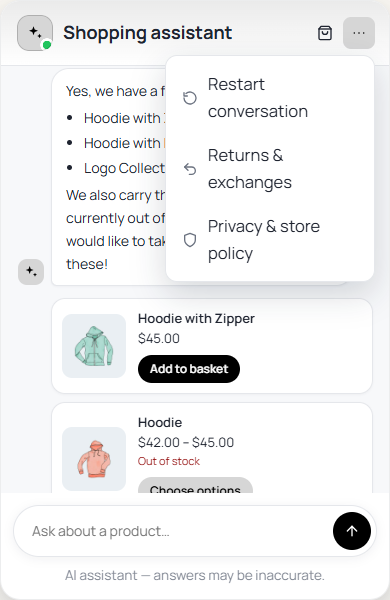
| Chat menu | Returns & exchanges opens the form. |
| Under a reply | When a customer writes about returning, exchanging, a refund or a damaged item, a Start a return or exchange button appears. |
| Under their orders | When the chat lists a customer’s orders, each order that can be returned gets Return and Exchange buttons. |
How the Form Works
- Your requests — the customer’s own return and exchange requests with their status, such as “Return requested”.
- Which order is it from? — their orders that can still be returned.
- Return or Exchange, then how many of each item.
- Reason from your Returns for WooCommerce reasons, and Tell the shop what happened.
- Send request — the request is filed and the customer is told the shop will review it and email them.
Nothing is filed until the customer presses Send request. A customer only ever sees and acts on their own orders, never by email address, and the AI cannot file a return by itself.
Which Orders Can Be Returned
Returns for WooCommerce decides: the order’s status must be one of its eligible statuses (Completed by default) and the order must be inside the return window (14 days by default). An order still Processing does not get Return or Exchange buttons until it is completed. Change these rules in the Returns for WooCommerce settings.
Exchanges in the chat are for the same item, for example a replacement, or another size written in the description. For an exchange to a different product, customers use the Returns for WooCommerce form in My account.