The Activity tab shows what the chat did for your shop, and a log of every action the assistants took.
AI Shopping Assistant → Activity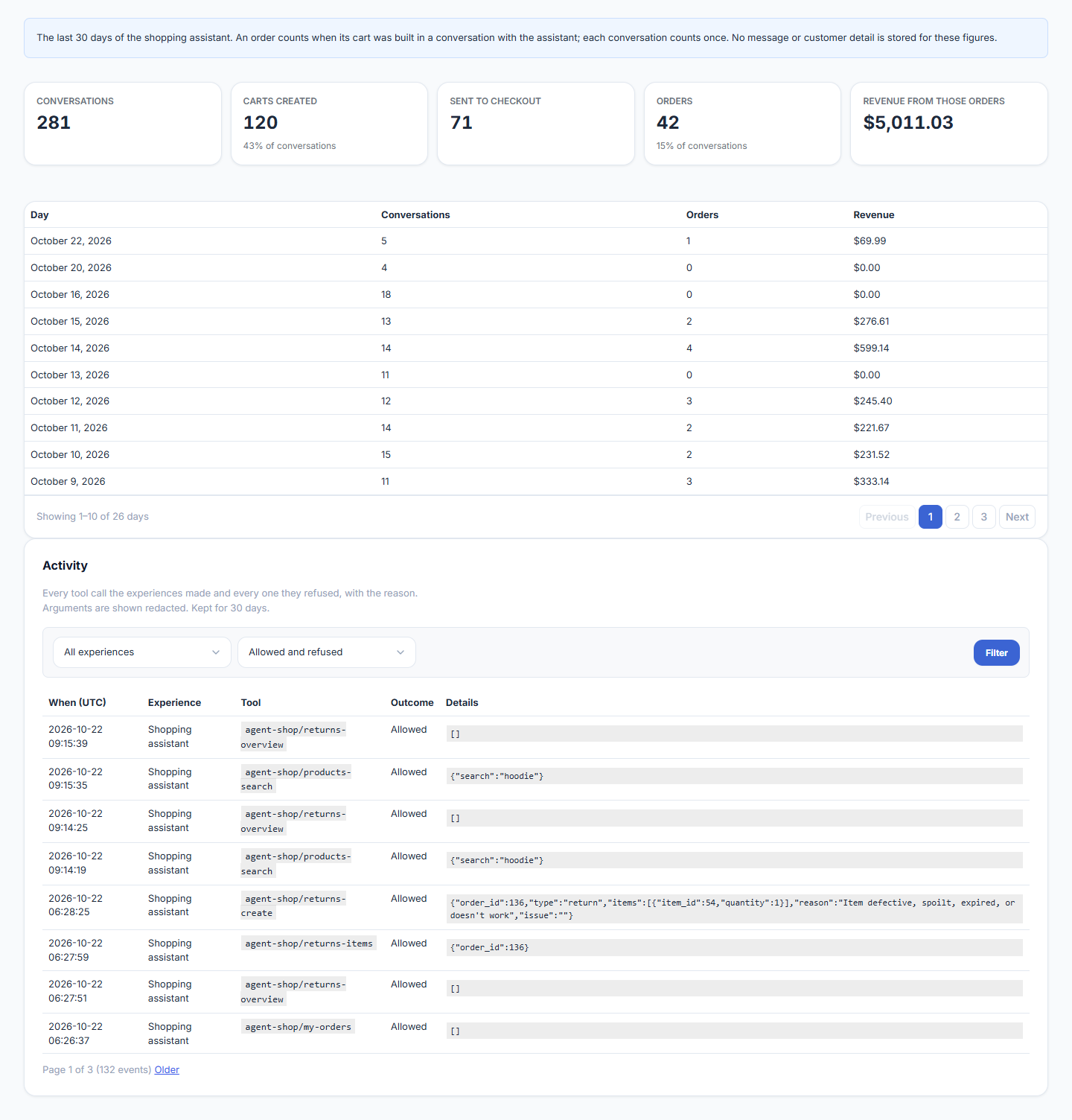
Results Over the Last 30 Days
| Figure | What it counts |
|---|---|
| Conversations | Conversations with the shopping assistant. |
| Carts created | Conversations where the chat added something to the basket, and the share of all conversations. |
| Sent to checkout | Shoppers the chat sent to your checkout. |
| Orders | Orders placed from a basket built in a conversation. |
| Revenue from those orders | The total of those orders. |
Below the figures, a table shows the same by day, newest first. No message or customer detail is stored for these figures; each conversation counts once.
These figures are always counted, whether or not you save conversations. They hold no message and no customer detail: a conversation is a one-way code, and an order made from a basket the chat built is marked with that code.
Activity Log
Every tool call the assistants made, and every one they refused, with the reason. Filter by assistant and by Allowed or Refused.
| Column | What it shows |
|---|---|
| When | Date and time, in UTC. |
| Experience | Shopping assistant, Store assistant, or Website Brain for a knowledge request that was turned down. A site updated from an early build may also show Support, a chat that became part of the shopping assistant before 1.0.0. |
| Tool | What it did, such as a product search, add to basket, a discount code or a returns request. |
| Outcome | Allowed, or Refused with the reason. |
| Details | What was asked, with personal data and secrets removed. |
Entries are kept for 30 days by default. A refused action is normal: it means the assistant was stopped from doing something it is not allowed to do.
Without an Active License
The Activity tab is hidden along with the other tabs, and nothing new is recorded — neither assistant is running, so there is nothing to record. The daily clear-out pauses too, so everything already logged, and every figure already counted, is kept exactly as it is and reappears the moment the license is active again. See Installation & Setup.