The General Settings panel controls which orders appear in the Fulfillment Dashboard, which emails include tracking details, and how multiple shipments per order are handled.
To access it, go to WooCommerce → Shipment Tracking → Settings → General Settings.
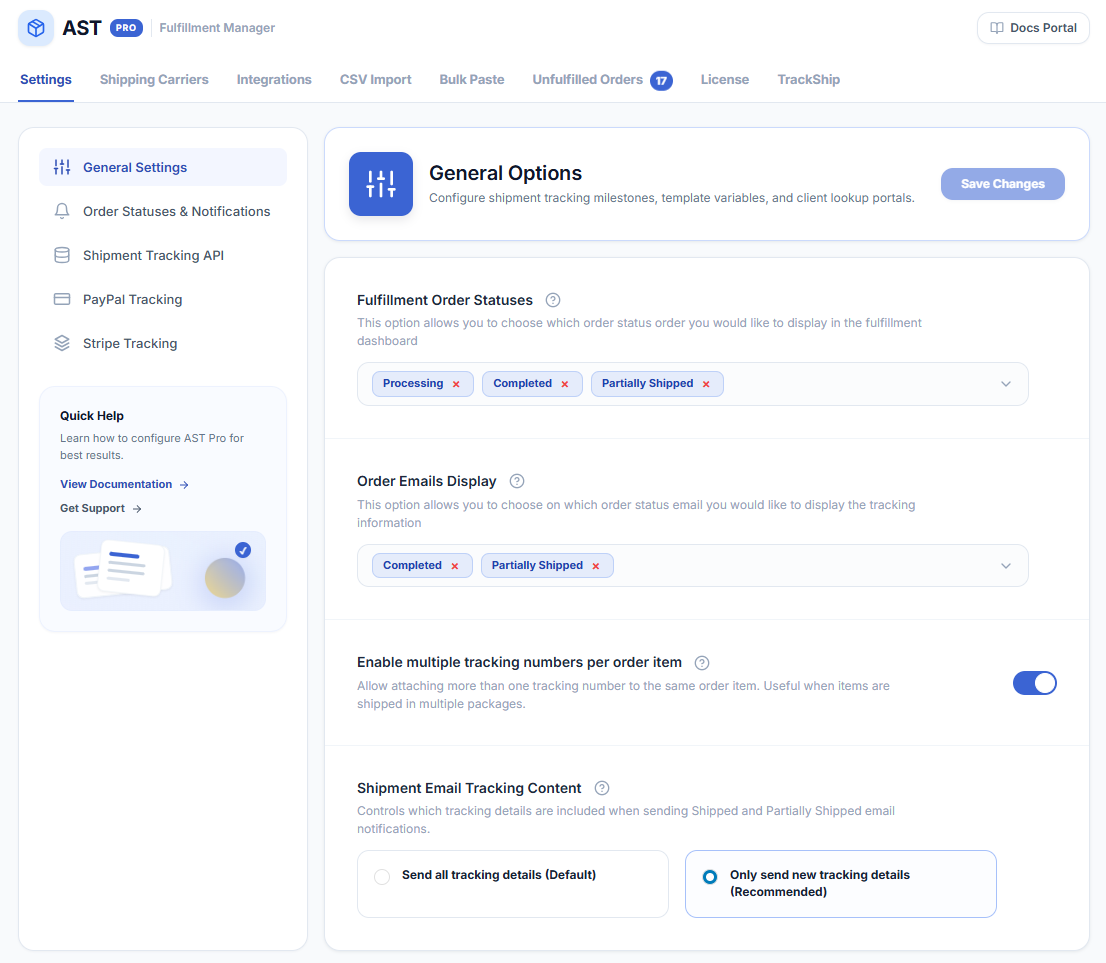
Fulfillment Order Statuses
Select which order statuses appear in the Fulfillment Dashboard and in the Order Actions dropdown when adding tracking. Only orders with the selected statuses show up in the fulfillment view, so you can focus on unfulfilled orders.
Typical selection: Processing and Partially Shipped. If you use a custom pre-shipment status (such as “Awaiting Dispatch”), add that here too. Configure custom statuses under Order Statuses & Notifications.
Order Emails Display
Choose which WooCommerce email notifications include the tracking widget when a tracking number is added. Customers receive tracking info alongside the email for every status you select here.
Common selections:
- Completed — the default WooCommerce shipped email
- Partially Shipped — for orders with item-level tracking
- Customer Invoice / Order Details — resends tracking when the invoice is emailed
- Shipped (custom status) — if you have enabled a custom Shipped status under Order Statuses & Notifications
Enable multiple tracking numbers per order item
When enabled, you can assign more than one tracking number to the same order item — useful when a single item ships in multiple packages. The extra tracking entries appear in the customer’s My Account → Orders page and in the tracking email widget alongside the item.
Leave this off if each order item always ships in one package.
Shipment Email Tracking Content
Controls which tracking details are shown inside the tracking widget in Shipped and Partially Shipped emails. Toggle each field on or off depending on what your customers need:
- Carrier name — shows the shipping carrier (e.g. FedEx, UPS, USPS)
- Tracking number — the raw tracking code
- Tracking link — a clickable link to the carrier’s tracking page
- Ship date — the date the tracking number was added
Save changes
Click Save changes at the bottom of the panel after making any edits. Settings take effect immediately for new tracking numbers added after saving.