Automatically notify customers via SMS whenever their return or exchange request changes status — requested, approved, completed, rejected, or converted to store credit — using the Returns for WooCommerce plugin together with SMS for WooCommerce.
Requirements
Requires Returns for WooCommerce and SMS for WooCommerce to both be installed and active on your site.
Setup Instructions
- Ensure Returns for WooCommerce is installed and active.
- Go to Returns Dashboard → Notifications → SMS tab — you will see a button linking to the SMS settings.
- Go to WooCommerce → SMS Settings → SMS Notifications → Returns & Exchanges.
- Enable the toggles for the return and exchange events you want to notify customers about.
- Edit the SMS message template for each event. Use placeholders like {billing_name} and {order_id} to personalise the message.
- Click Save & Close to save your changes.
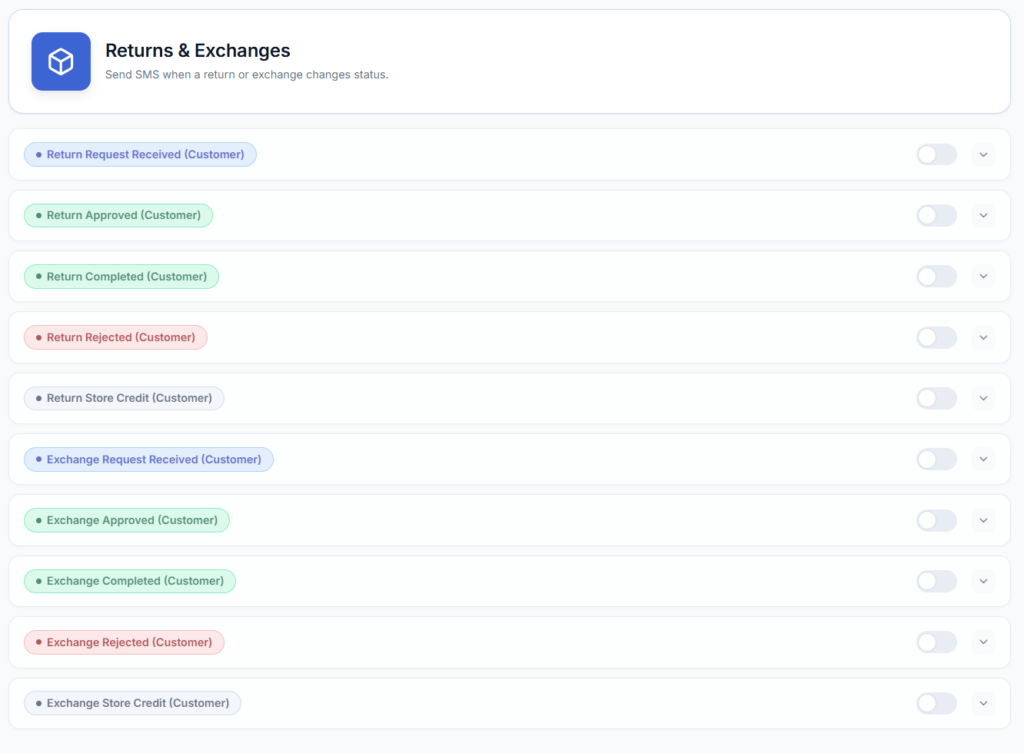
Available SMS events for Returns & Exchanges
The integration supports 10 customer-facing events, one per return/exchange status. Each SMS is sent to the order’s billing phone (falling back to the shipping phone if billing phone is empty) as soon as that status is set, independently of whether the matching email notification is enabled.
Returns
- Return Requested – Customer submits a return request.
- Return Approved – Admin approves the return request.
- Return Completed – The return is marked complete (item received / refund issued).
- Return Rejected – Admin rejects the return request.
- Return – Store Credit – The return is resolved with store credit instead of a refund.
Exchanges
- Exchange Requested – Customer submits an exchange request.
- Exchange Approved – Admin approves the exchange request.
- Exchange Completed – The exchange is marked complete (replacement shipped).
- Exchange Rejected – Admin rejects the exchange request.
- Exchange – Store Credit – The exchange is resolved with store credit instead of a replacement.
Available placeholders for Returns & Exchanges SMS
Use the following variables in your SMS message templates to include dynamic order information.
- {billing_name} – Full name of the customer (first + last)
- {billing_first} – Customer’s first name
- {billing_last} – Customer’s last name
- {billing_phone} – Customer’s billing phone number
- {order_id} – The WooCommerce order number
- {order_amount} – Total amount of the order
- {shop_name} – Your store name
- {shop_url} – Your store URL
- {email} – Customer’s billing email address
- {payment_url} – Link for the customer to complete payment
Troubleshooting
- No SMS is sent for a return/exchange status change – confirm SMS for WooCommerce sees Returns for WooCommerce as active, and that the specific event’s toggle is enabled under WooCommerce → SMS Settings → SMS Notifications → Returns & Exchanges.
- SMS goes out but the message is blank/default – the template for that event is empty; edit it under the same Returns & Exchanges settings tab.
- Customer never receives the text – check the order has a billing phone (or a shipping phone as fallback) saved; requests with neither will not send.
See the full list of supported integrations on the Compatibility page.
Next Steps
- SMS Notifications (Returns for WooCommerce) – Full configuration guide for SMS notifications inside the Returns plugin settings.
- Compatibility – See all plugins and integrations supported by SMS for WooCommerce.
- Email Notifications – Configure email templates for return and exchange status updates.