Send a one-off custom message directly from the order screen for exceptions or personal follow-ups.
- In your WordPress admin, go to WooCommerce → Orders.
- Open the order you want to contact.
- Scroll to the SMS section in the order edit screen.
- Enter the message you want to send to the customer.
- Review the phone number shown for the order.
- Send the SMS.
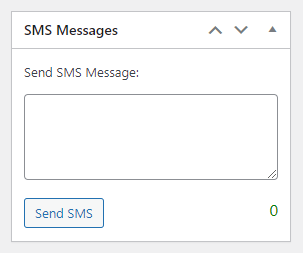
The manual message box accepts the same dynamic placeholders as customer order-status SMS (for example {order_id}, {billing_name}, {order_amount}) — see How to customize customer SMS messages using placeholders for the full list. The message is sent to the phone number on the order regardless of the customer’s SMS opt-in status, since this is a manually triggered, one-off message rather than an automated order-status notification.
Troubleshooting
- No SMS section on the order screen: confirm an SMS gateway is connected under WooCommerce → SMS Settings → Settings.
- Message not delivered: check that the order has a valid billing (or shipping) phone number in E.164-compatible format.
- Placeholders show up as literal text instead of real values: double-check the exact spelling of the placeholder against the reference list — misspelled tags are sent as-is.