Personalize automated messages by inserting dynamic data tags like order ID, billing name, or payment URLs. This page covers the placeholders available in customer order-status SMS.
- Open WooCommerce → SMS Settings → SMS Notifications.
- Select a customer notification message to edit.
- Insert placeholders directly into the message text where dynamic data should appear.
- Use to create line breaks if needed.
- Save your changes.
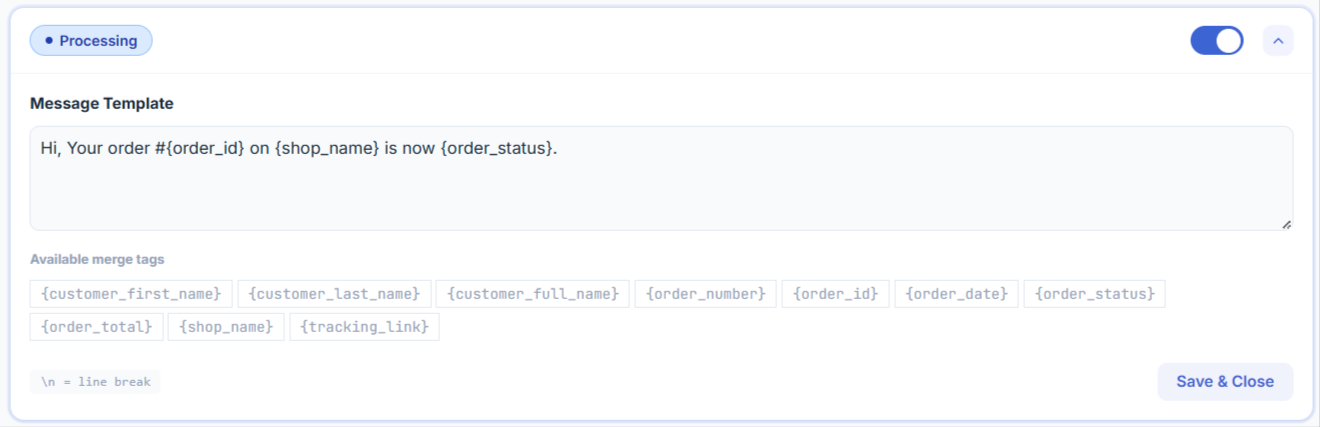
Available placeholders for customer order SMS:
- {shop_name} – the name of your site
- {order_id} – the order number/ID
- {order_count} – the number of orders the customer has placed
- {order_amount} – the total amount of the order
- {order_status} – the status of the order
- {billing_name} – the customer’s full name from the billing information
- {billing_phone} – the customer’s phone number from the billing information
- {billing_first} – the customer’s first name from the billing information
- {billing_last} – the customer’s last name from the billing information
- {shipping_name} – the name used in the order shipping information
- {shipping_first} – the first name from the shipping information
- {shipping_last} – the last name from the shipping information
- {shipping_address} – the full formatted shipping address
- {shipping_address_1} – the first line of the shipping address
- {shipping_address_2} – the second line of the shipping address
- {shipping_city} – the city from the shipping information
- {shipping_postcode} – the postal/ZIP code from the shipping information
- {shipping_country} – the country from the shipping information
- {payment_url} – the URL for the customer to complete payment for the order
- {shop_url} – the URL of your shop’s homepage
- {email} – the customer’s email address
Shipment tracking placeholders (require an active tracking plugin)
{tracking_link} and {tracking_number} only resolve to a real value when Advanced Shipment Tracking, WooCommerce Shipment Tracking, or TrackShip is installed and active on your store. Without one of those plugins active, these placeholders will not be replaced.
Removed placeholders (as of version 2.5.1)
The tags {customer_first_name}, {order_number}, and {order_total} were removed in version 2.5.1 because they had no matching replacement and were sent to customers as raw, unreplaced text. If your templates still contain them, update the message to use {billing_first}, {billing_last}, {billing_name}, {order_id}, and {order_amount} instead — see the Changelog.
SMS cost and message segments
SMS is billed per segment by your SMS gateway, not per message. A single segment holds up to 160 characters if the message uses only GSM-7/Latin characters, or up to 70 characters if it contains any unicode/non-Latin character (emoji, accented letters, non-Latin scripts, etc.). Once a message — after placeholders are replaced — exceeds that limit, it is split into multiple segments and billed accordingly. Keep templates short, and be aware that placeholders like {shipping_address} or {billing_name} can push a message past the single-segment limit depending on the data they resolve to.