Manually update a customer’s SMS consent status directly within their order details.
- Go to WooCommerce → Orders.
- Open the order you want to update.
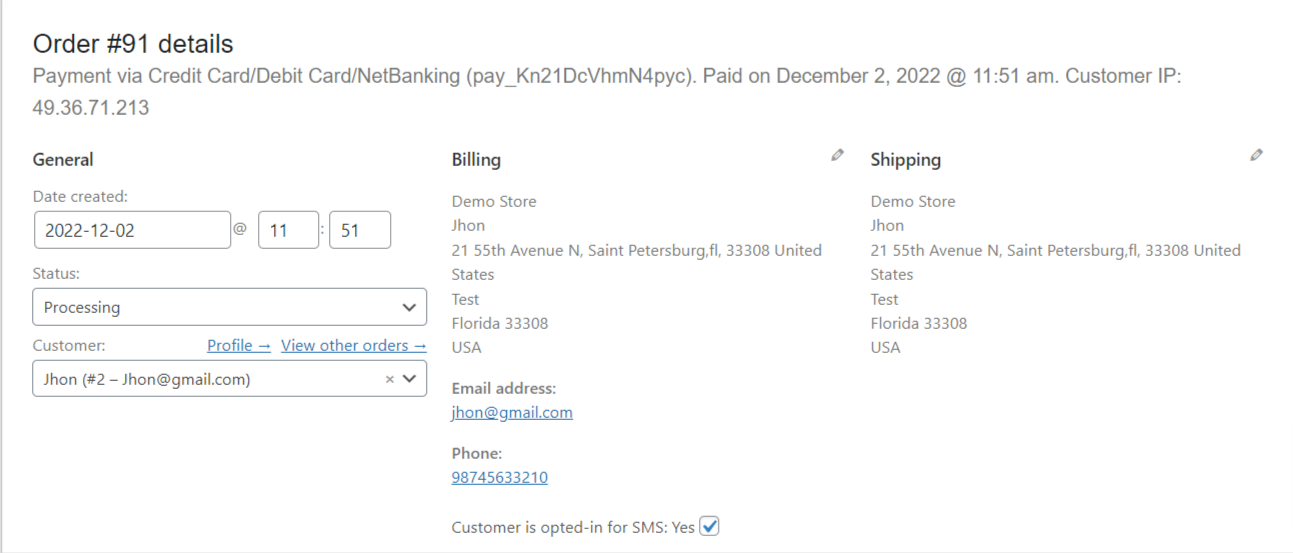
- Locate the SMS opt-in status in the order admin panel.
- Change the customer’s status to opt in or opt out as requested.
- Save or update the order.
This does not replace the customer’s own consent
Flipping this toggle to “opted in” from the admin screen does not capture the customer’s own affirmative consent — it only changes what the store’s database says about them. SMS consent regulations (TCPA in the US, and similar rules elsewhere) generally require the customer to take the opt-in action themselves, for example by ticking the checkbox at checkout. Only use this admin toggle to opt a customer in when you have independent, documented proof that the customer actually consented (for example, a signed form or a recorded request from the customer to enable SMS updates) — never as a way to enroll a customer who hasn’t consented themselves. Opting a customer out here is safe to use at any time, including on the customer’s request.