Automatically notify the admin when a customer adds an item to their wishlist, and notify customers when their wishlist items come back in stock, go on sale or have a promotional offer — using the YITH WooCommerce Wishlist plugin together with SMS for WooCommerce.
Requirements
Requires YITH WooCommerce Wishlist (free or Premium) and SMS for WooCommerce to both be installed and active on your site. Back-in-stock, on-sale and promotion notifications additionally require the YITH Wishlist Premium email campaigns to be configured — the SMS messages piggy-back on those same triggers.
Setup Instructions
- Ensure YITH WooCommerce Wishlist is installed and active.
- Go to WooCommerce → SMS Settings → Settings and configure your SMS gateway (Twilio, Nexmo, MSG91, Lox24 or any of the supported providers).
- Make sure the Admin Phone Number and Sender Phone Number are saved on the Settings tab — the “Item Added to Wishlist” alert is sent to the admin phone.
- For customer notifications, make sure the customer has a phone number on their WordPress / WooCommerce profile.
- Go to WooCommerce → SMS Settings → SMS Notifications → YITH Wishlist.
- Enable the toggles for the events you want to send SMS for.
- Edit the SMS message template for each event. Use placeholders like {member_name}, {product_name} and {sale_price} to personalise the message.
- If you want to send back-in-stock, on-sale or promotion SMS, schedule the matching YITH Wishlist email campaign — the SMS will be dispatched at the same time as YITH sends its email.
- Click Save & Close to save your changes.
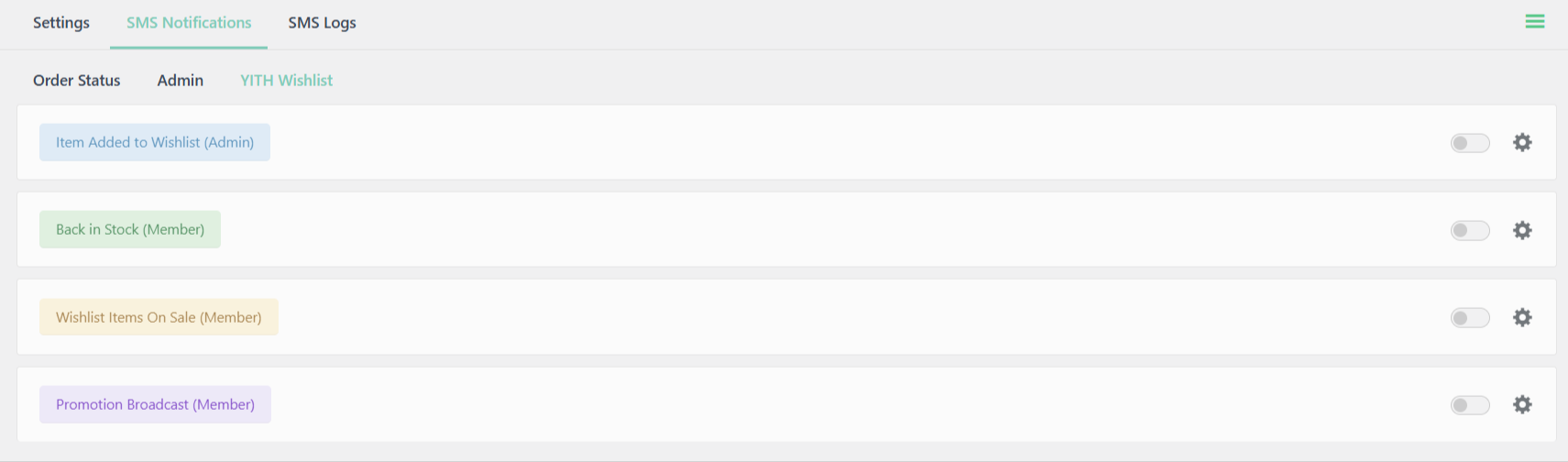
Available SMS events for YITH Wishlist
The YITH Wishlist integration supports 4 events.
- Item Added to Wishlist (Admin) – A customer (logged-in or guest) adds a product to their wishlist. The SMS is sent to the admin phone number so you know there is fresh shopping intent on the site.
- Back in Stock (Member) – One or more out-of-stock items on the customer’s wishlist are back in stock. Fires from YITH’s send_back_in_stock_mail trigger.
- Wishlist Items On Sale (Member) – One or more items on the customer’s wishlist are now on sale. Fires from YITH’s send_on_sale_item_mail trigger and includes the sale price and discount percent.
- Promotion Broadcast (Member) – Admin sends a promotional broadcast from the YITH dashboard. Fires from YITH’s send_promotion_mail trigger.
Available placeholders for YITH Wishlist SMS
Use the following variables in your SMS message templates to include dynamic information. The settings page sidebar shows only the placeholders that resolve for the specific event being edited.
Common (every event)
- {member_name} – Customer’s full name (falls back to “a guest” for guest wishlist activity)
- {member_first} – Customer’s first name
- {member_last} – Customer’s last name
- {member_email} – Customer’s email address
- {shop_name} – Your store name
- {shop_url} – Your store URL
- {email} – Recipient’s email
- {wishlist_url} – URL of the customer’s wishlist
Product (all events)
- {product_name} – Product title
- {product_url} – Public product permalink
- {product_price} – Current product price
Batch (Back in Stock & On Sale)
{item_count}– Number of wishlist items the SMS covers
Price change (On Sale only)
- {regular_price} – Product’s regular price
- {sale_price} – Sale price
- {discount_percent} – Discount as a percentage (e.g. “20%”)
For the full list of supported plugins, see the Compatibility overview.