Integrate ClickSend to deliver SMS messages using your existing account credentials.
- Log in to your WordPress admin and go to WooCommerce → SMS Settings.
- Select ClickSend as the provider.
- In a new tab, log in to your ClickSend account and go to Developers → API Credentials.
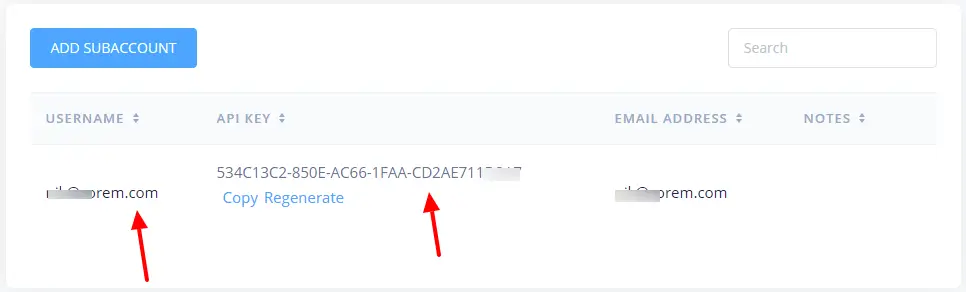
- Copy your Username and API Key.
- Go to Numbers → SMS and copy your SMS-enabled phone number.
- Return to SMS For WooCommerce Settings and paste the Username, API Key, and Sender phone number.
- Save your changes
How to get your ClickSend API Key:
- Login into your ClickSend account.
- Navigate to Developers > API Credentials
- You will need to enter your Username & API key in your General Settings.
- Copy the API Key and use it in the SMS provider settings.
How to get your ClickSend phone number:
Click on the Numbers > SMS and copy the phone number that you will enter in your General Settings as the Sender phone number.
About ClickSend
ClickSend lets you send SMS messages globally, through A Web Based SMS Portal or Transactional SMS via SMS Gateway API. Using ClickSend SMS you can be confident your customers and staff are receiving and reading your SMS messages.
