Enable SMSdk as your provider using your API key.
- Go to WooCommerce → SMS Settings and select SMSdk.
- Log in to your SMSdk account and go to Settings → API.
- Copy your API key and Sender Name/Number.
- Paste the API key and sender into SMS For WooCommerce Settings.
- Save your changes.
Screenshots below may not match your dashboard
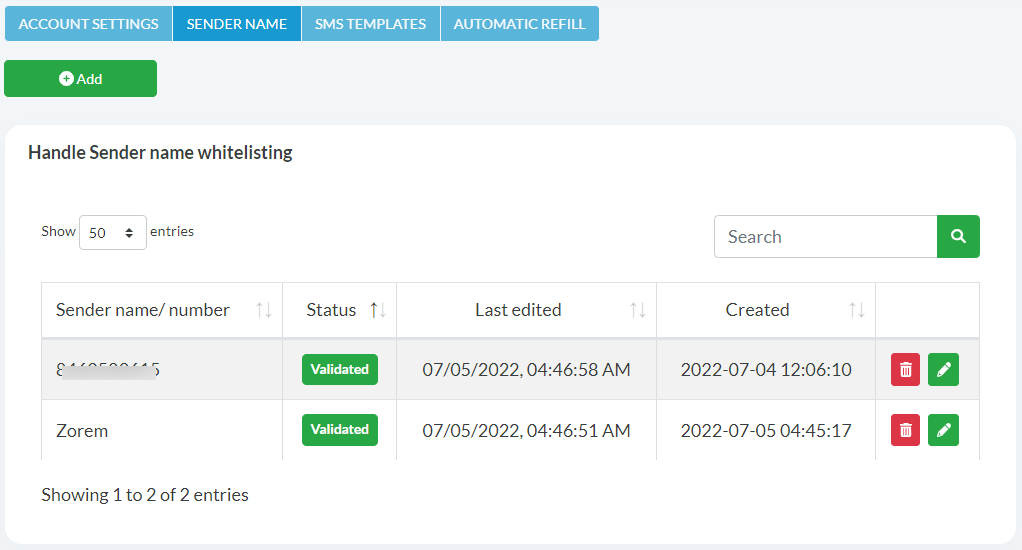
The screenshots on this page were originally captured from a different provider’s dashboard (ProSMS) that shares SMSdk’s underlying platform. Field names and their positions in your own SMSdk account may look different — the steps and field labels described in the text are accurate for SMSdk; use them as your guide rather than the exact screenshot layout.
How to get your SMSdk API Key:
- Login to your SMSdk account.
- Go to SMSdk Settings > API and copy your API key.

How to get your SMSdk phone number:
- Go to Sender Name and copy your Sender name/number.
- Enter the API key and Sender name in your SMS Settings.
Coverage and Sender ID requirements
SMSdk (sms.dk) is a Denmark-based SMS service, best suited to sending within Denmark and the wider Nordic/EU region. As with most EU providers, an alphanumeric sender name typically needs to be registered/whitelisted with SMSdk before it will deliver reliably to local carriers.
Test your connection
- After saving your SMSdk API key and Sender Name, use the Send Test SMS option on the settings screen.
- Send a test message to a number you control and confirm delivery.
- If it fails, check the Troubleshooting section below.
Troubleshooting
- Can’t find a field shown in the screenshots: the screenshots on this page come from a related dashboard and may not exactly match your SMSdk account’s layout — look for the equivalently-named field (API key / Sender name) instead.
- Invalid API key error: re-copy the key from SMSdk Settings → API — regenerating it invalidates the previous value.
- Sender name rejected: the sender name isn’t registered/whitelisted on your SMSdk account yet.
- Test message never arrives: check your SMSdk account balance; sends fail silently once credit is exhausted.
See the SMS Gateways overview to compare other providers, or the general provider connection guide.