Configure EasySMS as your provider using your API key.
- Go to WooCommerce → SMS Settings and select EasySMS.
- Log in to your EasySMS account.
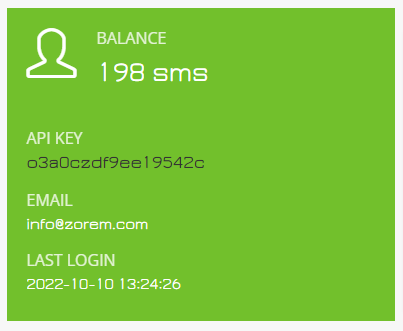
- Copy your API key and sender phone number.
- Paste these details into SMS For WooCommerce Settings.
- Save changes.
How to get your EasySMS API Key:
Coverage and sender ID requirements
EasySMS’s primary service area is generally India and the wider APAC region, with international routing available beyond that. Sender ID rules vary widely by destination country and many require pre-registration for alphanumeric sender names — check EasySMS’s requirements for your target countries before going live.
Test your connection
- In WooCommerce → SMS Settings, click Send Test SMS to confirm EasySMS delivers a message to your own phone.
- If the test fails, check the delivery log in your EasySMS dashboard for the specific error before troubleshooting further.
Troubleshooting
- Messages aren’t delivered: the sender phone number/ID isn’t approved for the destination country.
- Authentication error: the API key was regenerated in the EasySMS console since it was last saved here.
- Send blocked or fails silently: the EasySMS account balance is too low.
- Invalid recipient: the destination number is missing its country code — use full E.164 format (e.g. +14155552671).
More SMS gateway integrations
See every supported provider and how to get its API keys in the SMS Gateways overview.