- Log in to your WordPress admin and go to WooCommerce → SMS Settings.
- Select ClickSend as the provider.
- In a new tab, log in to your ClickSend account and go to Developers → API Credentials.
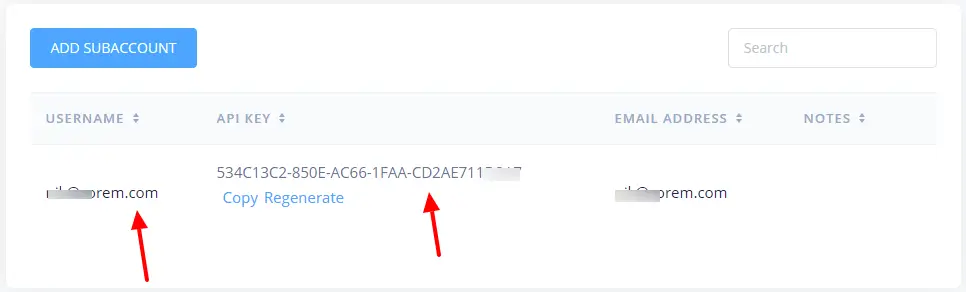
- Copy your Username and API Key.
- Go to Numbers → SMS and copy your SMS-enabled phone number.
- Return to SMS For WooCommerce Settings and paste the Username, API Key, and Sender phone number.
- Save your changes.
- Login into your ClickSend account.
- Navigate to Developers > API Credentials
- You will need to enter your Username & API key in your General Settings.
- Copy the API Key and use it in the SMS provider settings.
Click on Numbers > SMS and copy the phone number that you will enter in your General Settings as the Sender phone number.
Coverage and Sender ID requirements
ClickSend is an Australia-based provider with worldwide SMS delivery, so its default numeric or alphanumeric sender options vary by destination country — this is set by ClickSend and their local carrier agreements, not by this plugin. If you send primarily to the United States or Canada, use a real SMS-enabled long code or toll-free number as your Sender phone number: alphanumeric sender IDs are not deliverable on US/Canadian carriers. For most other countries, an alphanumeric sender name is usually accepted, though some destinations (for example India) require pre-registration before ClickSend will deliver messages under a custom sender ID.
Test your connection
- After saving your ClickSend credentials, scroll to the Send Test SMS section on the same settings screen.
- Enter a phone number you can check, then click Send Test SMS to confirm the credentials and sender number actually work end to end.
- If the test message doesn’t arrive within a minute or two, check the Troubleshooting section below before contacting support.
Troubleshooting
- Test message fails or is rejected: double-check the Username and API Key were copied without extra spaces — ClickSend’s API key is case-sensitive.
- Sender phone number invalid: confirm the number is SMS-enabled under Numbers → SMS in your ClickSend account; a voice-only number will be rejected.
- Messages queue but never arrive: check your ClickSend account balance — SMS sends fail silently once credit runs out.
- Delivery fails only to specific countries: that destination may require a pre-registered sender ID or be blocked entirely by local carrier rules; check ClickSend’s coverage page for that country.
See the SMS Gateways overview to compare other providers, or the general provider connection guide.