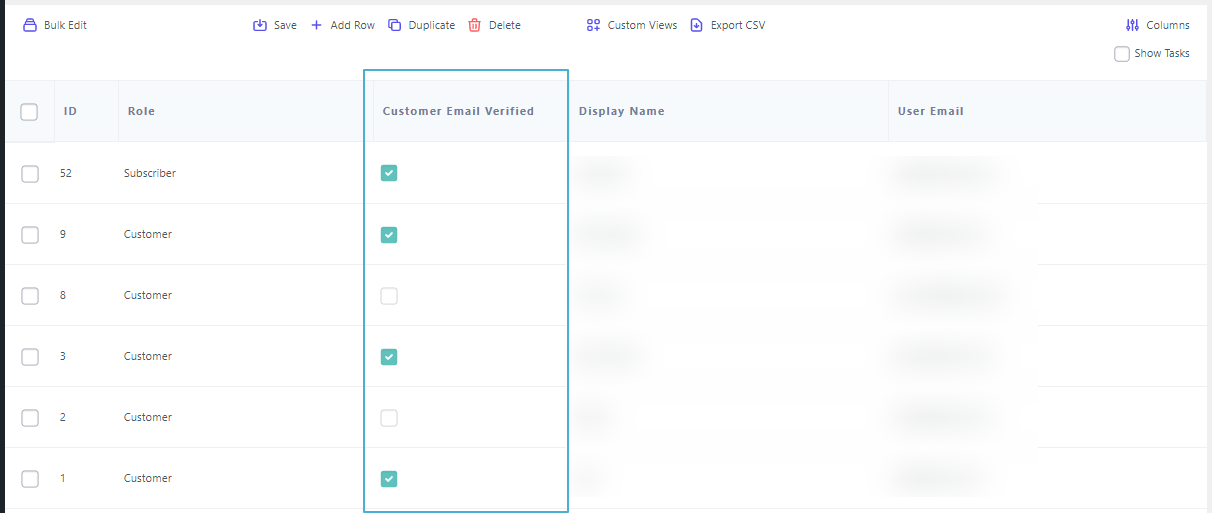
Customer Email Verification Pro doesn’t ship a dedicated Smart Manager integration — Smart Manager (by StoreApps) reads the plugin’s verification status directly from user data, so it can display it without any extra setup. Store administrators can see the email verification status of any registered user directly within Smart Manager — no need to check each user individually from WordPress admin.
How to Check Verification Status
- Open the Smart Manager plugin from your WordPress admin sidebar.
- Open the Users list within Smart Manager.
- Locate the email verification status column to see whether each registered user’s email is Verified or Unverified.
What to Expect
- Verification status is visible directly in the Smart Manager users list for all registered users.
- Both verified and unverified statuses are displayed, making it easy to scan many users’ status at a glance.
This page only confirms viewing verification status in Smart Manager. Bulk-editing it would depend entirely on Smart Manager’s own generic bulk-edit tools, not on anything Customer Email Verification Pro provides — that hasn’t been separately confirmed here, so don’t rely on it without testing it yourself first. No minimum tested version is documented for either plugin.
Related
- Compatibility — all supported plugins.
- Customer Management — CEV Pro’s own built-in verification status screen.