A new Analytics tab in WooCommerce → Email Verification that shows you exactly how the plugin is performing — how many signups you’re getting, how many complete email verification, how much spam is being blocked, and where the spam is coming from.
What it shows?
KPI cards (top of the page)
- Total Signups — customer accounts created during the selected date range, excluding administrators and editors. This is the merchant-meaningful “how many people signed up this period.”
- Verified — how many of those signups completed email verification.
- Spam Blocked — sum of every blocked email attempt in the period, across all block reasons: disposable (both the built-in list and the AI pattern match), MX-failed, blocklisted, not-in-allowlist, AI risk score, and bot cluster.
- Avg. Time to Verify — the average (mean) time between OTP sent and OTP verified, for users who completed verification.
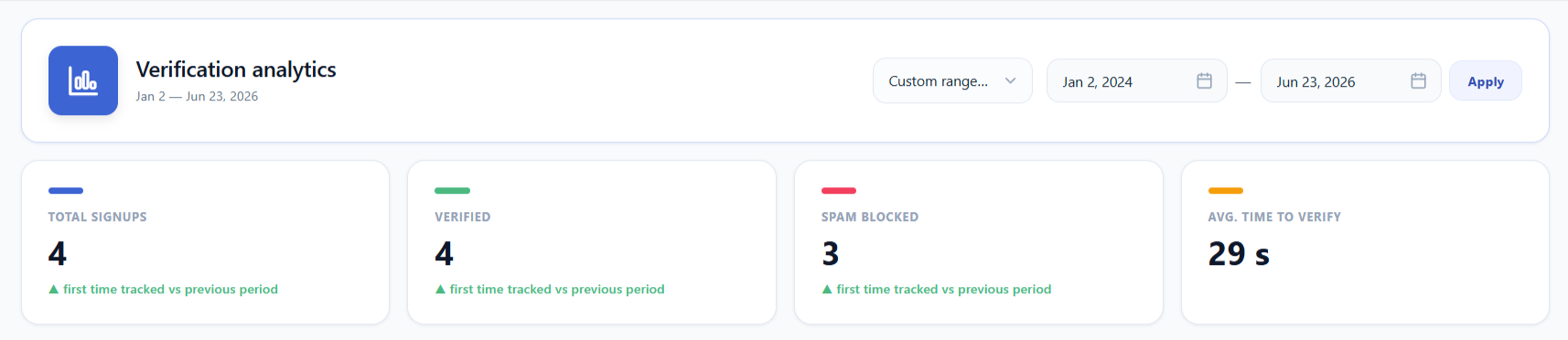
Each card shows a small trend indicator below it: “▲ +12.3% vs previous period” so you can see whether numbers are climbing.
Time-series chart
A line chart with three series — Signups (blue), Verified (green), Blocked (red) — across the selected date range. The Blocked line rolls up every block reason into one series, so a spam wave shows as a single spike no matter which rule stopped it.
The chart’s bucket size automatically adapts to how many days are in the selected range — this applies the same way whether you picked a preset or a custom range:
- Range of 31 days or less → daily buckets (covers Last 7 days and Last 30 days)
- Range of 32–180 days → weekly buckets (covers Last 90 days, and most custom ranges up to about 6 months)
- Range of 181–1,095 days (about 3 years) → monthly buckets
- Range over 1,095 days → yearly buckets
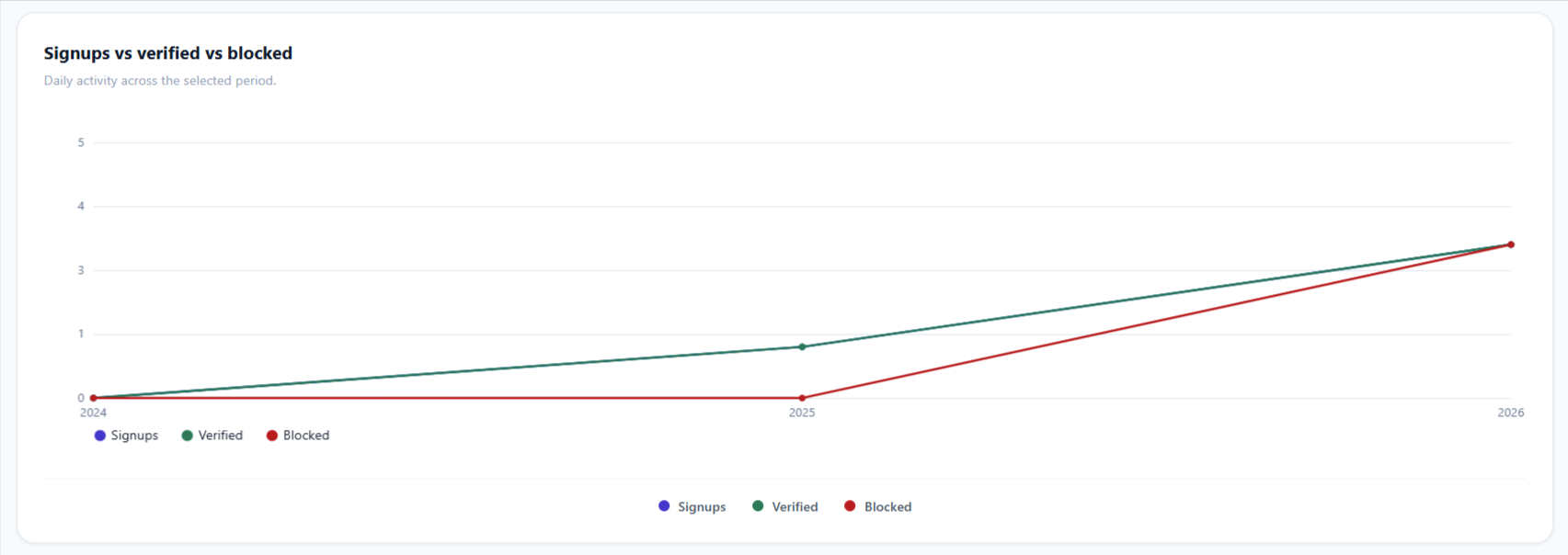
This keeps the line readable instead of flattening into a horizontal bar over a long range.
Verification funnel
A two-step funnel showing the drop-off from “Verification email sent” to “Code verified”:
- Step 1 — Verification email sent: every OTP that left your server, including incomplete signups (people who got the email but never finished registration).
- Step 2 — Code verified: how many of those people actually entered the code correctly.

The percentage tells you the completion rate — if step 2 is much lower than step 1, you have a lot of abandoned signups and might want to revisit your OTP email design or expire time.
Verification status widget
A snapshot of your registered users in the period, split between Verified (green bar) and Unverified (amber bar), with counts and percentages. Gives you a quick read on what fraction of your customer accounts are sitting unverified.
If you use Paid-Order Gatekeeping, a third Pending paid order bar appears between the two — customers who confirmed their email but haven’t completed a paid order yet. The row is only rendered when that count is above zero, so stores that don’t use the feature see the familiar two-bar widget.
Top blocked domains
A top-10 list of which email domains are being blocked most — useful for spotting which disposable-email providers are targeting your store, or whether your allowlist is too strict. It counts every block reason, so domains stopped by the AI pattern match or the risk score show up here alongside the built-in disposable list. See Spam Protection for how each rule works.
AI risk scoring
Sits directly below Top blocked domains and reports how the risk engine judged sign-ups in the selected period:
| Metric | What it means |
|---|---|
| Avg. signup risk | The mean 0–100 score across every sign-up scored in the period. A low average with occasional spikes is normal; a steadily climbing average usually means a bot run is under way. |
| Blocked by AI | How many sign-ups the risk score itself rejected. This is a subset of the Spam Blocked KPI, which also counts the disposable, MX, blocklist, allowlist and bot-cluster rules. |
| Signups scored | How many sign-ups the engine assessed in total — the denominator for the average. |
Below the three figures, Top risk reasons ranks the up-to-five signals that contributed most often — Random-looking mailbox, Unusual domain, Role / plus address, and Many signups from one IP. This is the fastest way to see why your store is being scored the way it is, and whether your sensitivity setting is pitched correctly.
How to use the date range?
The dropdown at the top right of the dashboard offers:
- Last 7 days
- Last 30 days (default — opens to this every time)
- Last 90 days
- Custom range — pick any two dates with the date pickers, click Apply.
The dashboard reloads instantly when you switch ranges. Custom date selections are remembered for the rest of your session — if you switch to another range and back to Custom, the dates come back pre-filled.
What feeds the data?
Every verification-related event the plugin handles is logged to a dedicated events table:
| Event | When it's logged |
|---|---|
otp_sent | A verification email is sent (signup, checkout, edit-account, login auth) |
otp_verified | A user enters the correct code |
otp_failed | A user enters the wrong code |
blocked_disposable | A signup with a disposable email is blocked by the built-in or custom domain list |
blocked_disposable_pattern | A signup is blocked by the AI pattern match — a throwaway domain that was not on any list |
blocked_mx | A signup with a non-existent mail server is blocked |
blocked_specific_email | A signup with an admin-banned email is blocked |
blocked_not_in_allowlist | A signup outside the B2B allowlist is blocked |
signup_risk_scored | A signup is assessed by AI risk scoring — stores the score, the action taken, and the reasons |
blocked_ai_risk | A signup is blocked because its risk score reached the high band |
blocked_bot_cluster | A signup is blocked as part of a detected bot cluster |
2fa_verified / 2fa_failed | A user enters their 2FA code (or backup code) |
2fa_enrolled | A user completes 2FA setup |
verification_pending_paid_order | A customer verifies their email but is held pending their first paid order |
verification_completed_via_paid_order | A pending customer is promoted to fully verified by a paid order (or an admin force-activate) |
retroactive_unverify | A customer is reset to unverified by the Force re-verify tool |
auto_deleted | A stale unverified user is cleaned up by the maintenance cron |
Exporting data
This dashboard itself has no CSV export — it’s built for at-a-glance trends, not raw rows. For a row-level export of individual customers (email, status, risk score, dates), use the Export CSV button on Customer Management instead.
Troubleshooting
- The whole dashboard is empty — widen the date range first (it defaults to Last 30 days); if this is a fresh install with no signups yet, every card will legitimately read zero until real traffic arrives.
- Numbers here don’t match the Unverified Users count — the two screens answer different questions. This dashboard’s KPIs are scoped to the selected date range and exclude administrators/editors; Customer Management‘s list shows the current, all-time state of every unverified record. A user who verified after the date range’s end, or who registered before it began, can appear differently on each screen.
- A card or block reason never appears — see the tip above: it means that spam-protection rule is still off, not that the dashboard is broken.