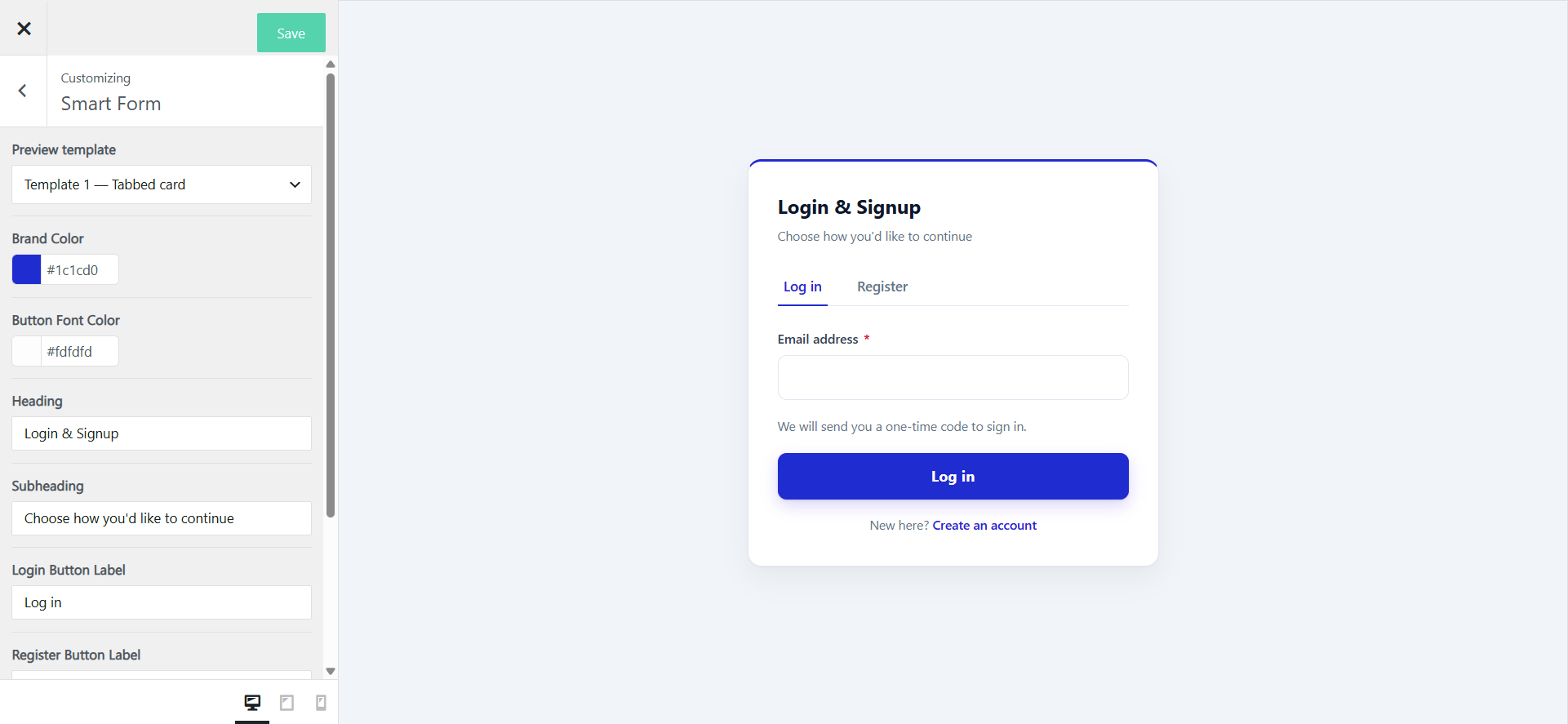
Smart Form’s design and copy are tuned from the existing Customizer tab, under a new Smart Form panel. Go to WooCommerce → Email Verification → Customize, then open the Smart Form panel.
Design options
- Brand title
- Brand colour
- Primary & secondary colour
- Button colour & text colour
- Text colour
- Background colour
- Font size
- Spacing & padding
- Corner radius
- Form width
- Logo
Content options
- Login button text
- Register button text
- OTP button text
- Resend OTP text
- Custom success messages
- Custom error messages
- Field placeholders
Notes & limitations
- Checkout verification is unchanged. Smart Form replaces the signup/login experience only. Guest checkout continues to use the existing Checkout Verification settings — nothing on the checkout page is affected by Smart Form.
- Phone verification requires an SMS gateway. If no gateway is configured, the Phone option will be greyed out with a setup link.
- Existing settings still apply. OTP length, expiry, resend limits, disposable-email blocking, MX checks, B2B allowlist, and the email block-list all continue to apply to Smart Form sign-ups — no duplicate configuration.
- Backwards compatible. Switching back to WooCommerce Form at any time restores the original WooCommerce login/registration experience. No customer data is lost.
- Translation-ready. All Smart Form strings (labels, buttons, error messages) are translatable via WPML and Polylang’s String Translations.