The Daily Pickup Pick-List (introduced in ALP PRO 1.9.5, and called the “Kitchen Display” in some changelog entries) adds a Today tab to your Fulfillment Dashboard. It works like a live preparation board, showing every pickup order due today, grouped by pickup time slot. It is designed to run on a tablet or wall-mounted screen so your team always has an at-a-glance view of what needs preparing, what is ready, and what has been collected.
WooCommerce → Fulfillment → Today tab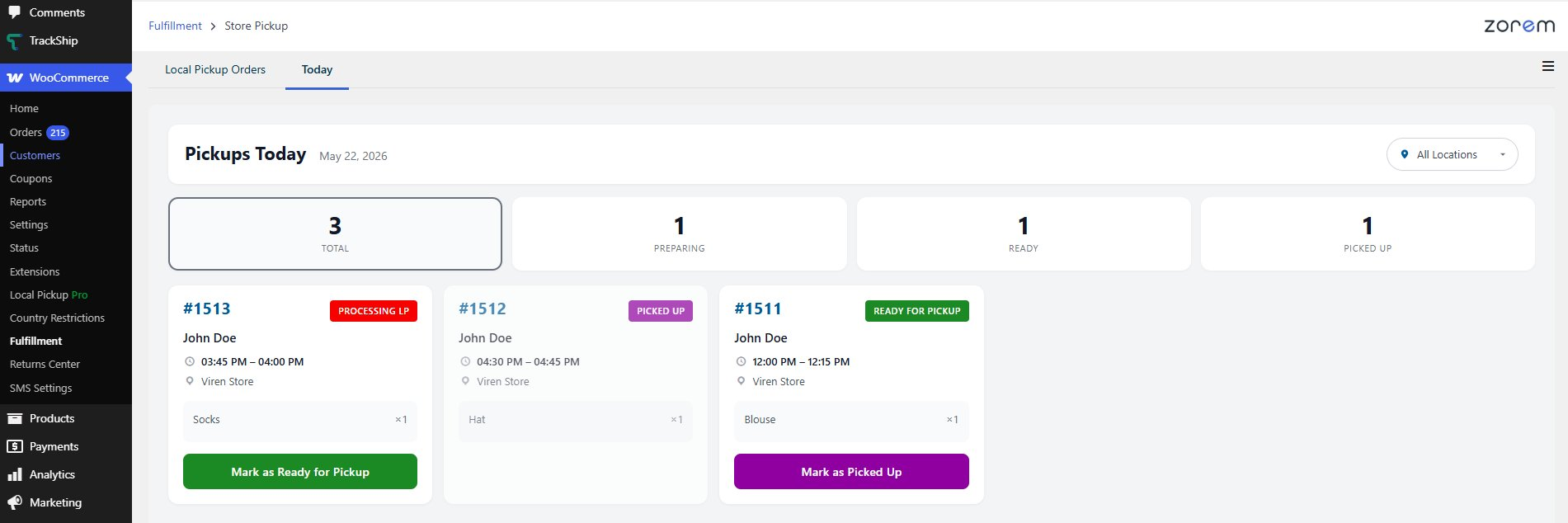
What the Board Shows
- A summary across the top: Total, Preparing, Ready, and Picked Up counts for the day.
- Today’s pickup orders only, grouped by their pickup time slot. Orders without a time slot — walk-in pickup orders placed today at locations without appointments — are included and listed after the scheduled slots.
- Each card shows the order number, customer name, pickup time, location, and items.
- A status badge on each card, mapped to the order status: Preparing (Processing or Processing LP), Ready for Pickup, or Picked Up. Orders in other statuses (cancelled, refunded, and so on) are not shown.
- Action buttons on each card to Mark as Ready for Pickup or Mark as Picked Up.
- A location filter so you can show one store at a time.
How “Today” Works
- Today means the current calendar day in your WordPress site timezone (Settings → General), not the viewing device’s clock. The board rolls over to the new day at midnight site time.
- Live updates — the board refreshes itself every 30 seconds, so staff never need to reload the page. It’s built as a live screen rather than a printable list.
Next Steps
- How to Use the Local Pickup Dashboard — the full orders view next to the Today tab.
- QR Code Pickup Handoff System — confirm handoffs by scanning.
- How to Set Up Pickup Appointments — the time slots the board groups by.