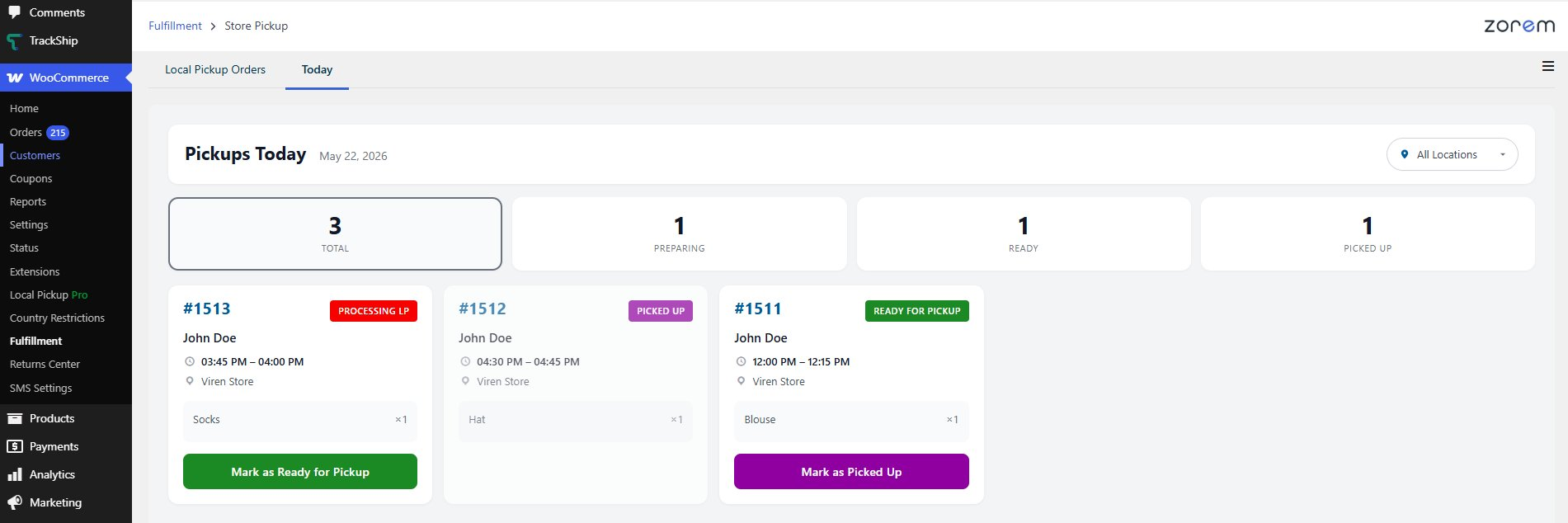
The Daily Pickup Pick-List adds a new Today tab to your Fulfillment Dashboard. It works like a live preparation board, showing every pickup order due today, grouped by pickup time slot. It is designed to run on a tablet or wall-mounted screen so your team always has an at-a-glance view of what needs preparing, what is ready, and what has been collected.
Where to find it
Where: Go to WooCommerce → Fulfillment → Store Pickup, then click the Today tab next to “Local Pickup Orders”.
What the board shows
- A summary across the top: Total, Preparing, Ready, and Picked Up counts for the day.
- Today’s pickup orders only, grouped by their pickup time slot.
- Each card shows the order number, customer name, pickup time, location, and items.
- A status badge on each card — Preparing, Ready for Pickup, or Picked Up.
- Action buttons on each card to Mark as Ready for Pickup or Mark as Picked Up.
- A location filter so you can show one store at a time.