The QR Code Pickup Handoff system gives every pickup order a unique confirmation code that the customer shows at the counter. Your staff scan the code from a phone or tablet, review the order on screen, and confirm the handoff — the order is then marked as Picked Up. This makes handoffs faster, removes the need to read out order numbers, and keeps a record of who completed each pickup and when.
The customer’s code appears automatically on their order page and in their pickup emails — there is nothing for them to set up. Each code is unique and secure, so it can only be used to confirm the matching order.
Where the customer sees their code
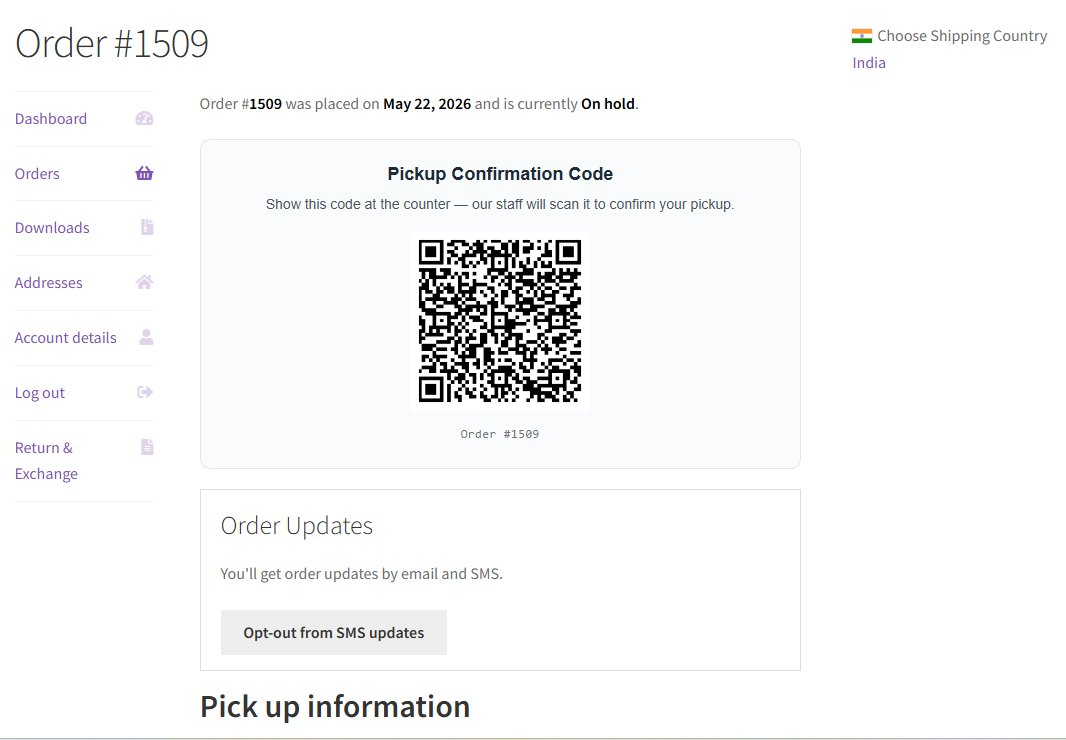
When a customer places a pickup order, a Pickup Confirmation Code is shown on the My Account → View Order page and inside their pickup confirmation email. The customer simply shows this code at the counter when they arrive.
Staff verification (prevents self-confirmation)
Because the confirmation code also appears in the customer’s own email and account page, the order is only marked Picked Up once the person confirming has proven they are a member of your staff. This stops a customer from scanning their own code and marking the order collected before they actually pick it up.
This is controlled by Require staff verification before marking picked up, found under WooCommerce → Local Pickup → Settings → Display Options (just under Show pickup confirmation QR code). It is on by default. With it on, a scan can be confirmed in one of two ways:
- Signed-in staff — a staff member logged in on the device taps Mark as Picked Up.
- Staff Pickup PIN — on a shared device that is not logged in, staff enter the PIN to confirm.
Staff Pickup PIN is an optional field in the same section. Set a short code that counter staff type on the scan screen to confirm pickups without logging in. After several incorrect attempts the device is locked for a few minutes to block guessing. Leave the PIN blank to require a logged-in staff account instead.
Tip: Prefer the quick “scan and confirm” flow without verification? Turn Require staff verification before marking picked up off. Staff still review the order and tap a button to confirm — the order is never marked Picked Up automatically on scan.
How staff scan the code
Your staff use a dedicated, mobile-friendly scan page. Open it on the counter phone or tablet and point the camera at the customer’s code. The order details load instantly so staff can confirm the right order, then either tap Mark as Picked Up (when signed in as staff) or enter the Staff Pickup PIN to complete the handoff.
What happens after a scan
- The code is checked to make sure it is valid and matches the order.
- Staff confirm the pickup by tapping Mark as Picked Up, or by entering the Staff Pickup PIN on a shared device.
- The order status changes to Picked Up.
- The pickup time and the staff member (or scan device) are saved with the order.
- An order note is added, for example: Order marked as picked up via QR scan at 2026-05-22 14:32 by John Doe.
Tip: If a code is scanned again after the order is already collected, the page shows the original pickup details instead of completing the order a second time — so you always have a clear, reliable pickup history.