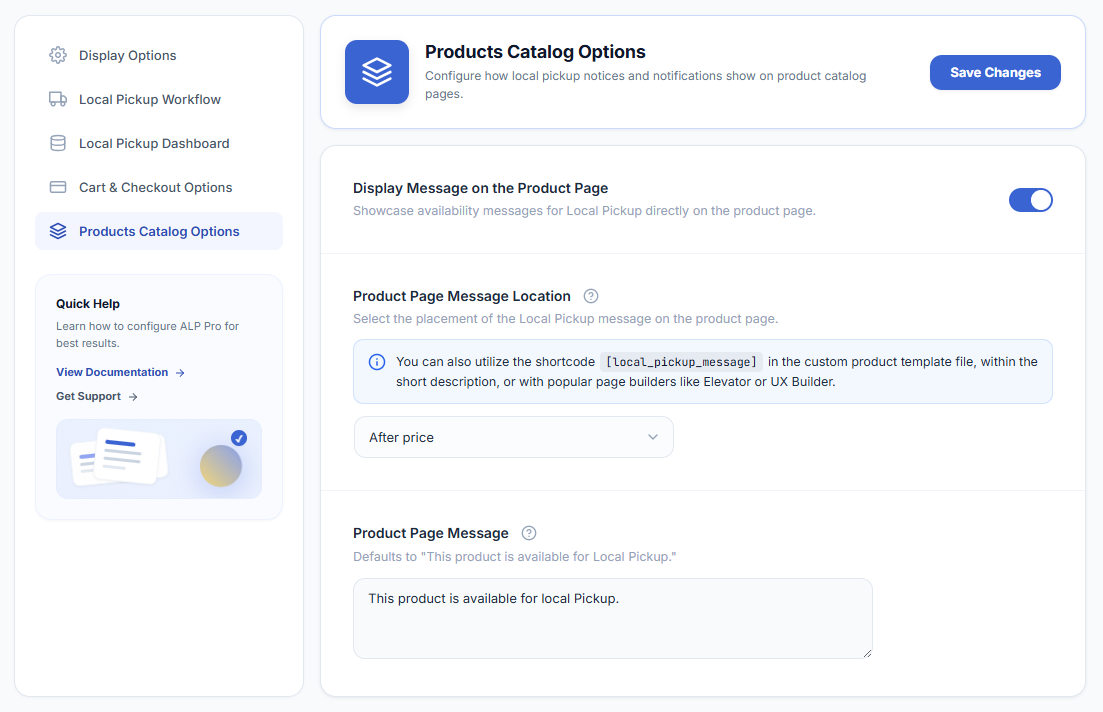
WooCommerce → Local Pickup Pro → Settings → Products Catalog OptionsThese options show a Local Pickup availability message on your product pages. The message appears only for products that are eligible for local pickup (available at at least one pickup location); virtual products never show it.
- Display Message on the Product Page (default: off) — show the Local Pickup availability message on the product page.
- Product Page Message Location — the placement of the message: Before title, After title, After price, After short description, After Add to Cart button (default), After meta, or After sharing. For a custom placement, use the shortcode below.
- Product Page Message — the message text. Default: “This product is available for Local Pickup.”
Placing the Message with the Shortcode
To place the message anywhere yourself — in a custom product template or with a page builder such as Elementor or UX Builder — use the shortcode:
[alp_local_pickup_message]The shortcode outputs the Product Page Message text set above (or the default text if empty), only on single product pages, and only for pickup-eligible, non-virtual products — otherwise it outputs nothing. See How to Display the Local Pickup Message on the Product Page for a walkthrough.
Next Steps
- How to Display the Local Pickup Message on the Product Page — page-builder walkthrough.
- How to Set Up Force Local Pickup — make products pickup-only.