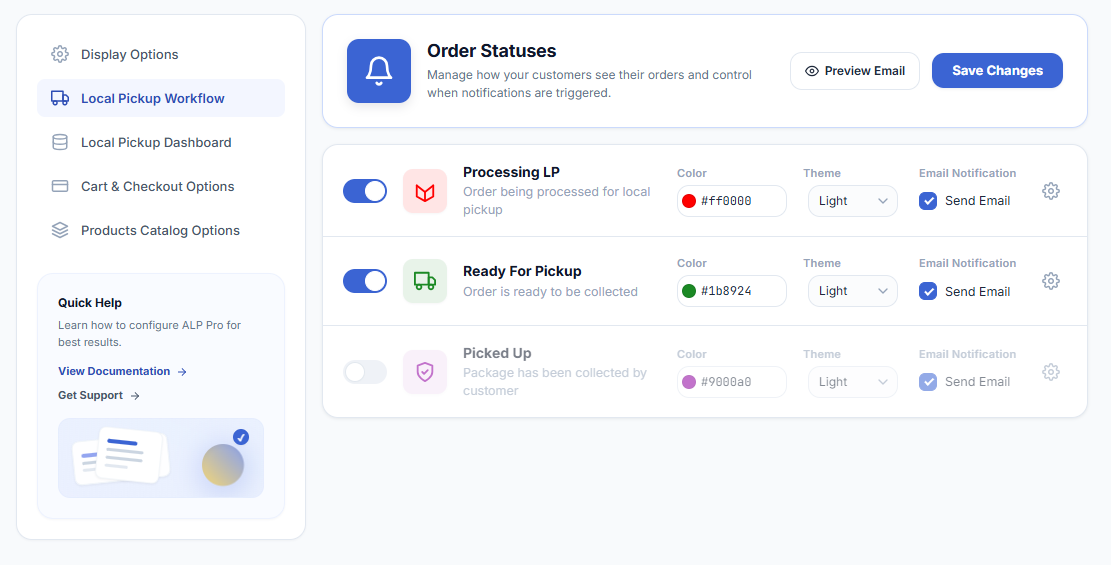
WooCommerce → Local Pickup Pro → Settings → Local Pickup WorkflowThe Local Pickup Workflow adds three custom order statuses that carry a pickup order from preparation to handoff. Each status can be enabled individually:
- Processing LP — order being processed for local pickup. When the order enters this status, the Processing LP email with the store pickup instructions is sent to the customer (if enabled).
- Ready For Pickup — order is ready to be collected. The Ready for Pickup email notifies the customer that they can come and collect the order (if enabled).
- Picked Up — package has been collected by the customer. An optional Picked Up confirmation email is sent (if enabled).
For each status you can adjust the Color of the status label, its Theme (Light or Dark text), and toggle the Email Notification. The email content itself is edited in the email customizer. The statuses appear in the order list, the order actions, and the bulk actions menu (for example, “Change status to Processing LP”).
Status Automations
Two settings drive status changes automatically:
- Automatically change the order status from processing to processing LP for local pickup orders — in Settings → Cart & Checkout Options. New pickup orders enter the workflow without manual intervention.
- Automatically mark as Ready For Pickup when the order status is Completed — when the order status becomes Completed, the system flips it to Ready For Pickup so the customer gets the pickup-ready notification automatically. Useful when your fulfillment tools mark orders Completed.
IMPORTANT
If you deactivate the plugin, orders sitting in the custom statuses would become status-less for WooCommerce. The deactivation flow therefore lets you reassign orders in Processing LP, Ready For Pickup, and Picked Up to standard WooCommerce statuses before the plugin is deactivated.
Next Steps
- How to Customize Email Notifications — the emails each status sends.
- How to Use the Local Pickup Dashboard — monitor orders as they move through the workflow.
- QR Code Pickup Handoff System — mark orders Picked Up by scanning.