Manage customer verification status and perform bulk actions from the WordPress admin.
How to View Customer Verification Status?
- Go to WordPress → Users.
- The Email Verification column shows each user’s status.
- Use the filter dropdown to show only verified or unverified users.
How to Manually Verify a Customer?
- Go to WordPress → Users.
- Find the customer you want to verify.
- Click the Verify action link, OR edit the user profile.
The Unverified Users tab lists every email that started verification but didn’t finish — both registered customers and guest checkout entries. From here you can resend reminders, export data, or remove rows in bulk.
You’ll find it at Settings → Unverified Users → User List.
How to View Unverified Users?
- Go to Settings → Unverified Users → User List.
- The table shows pending verifications with the customer’s name, email, the date they last attempted verification, and their risk score.
- The header strip displays pending count + oldest pending age at a glance.
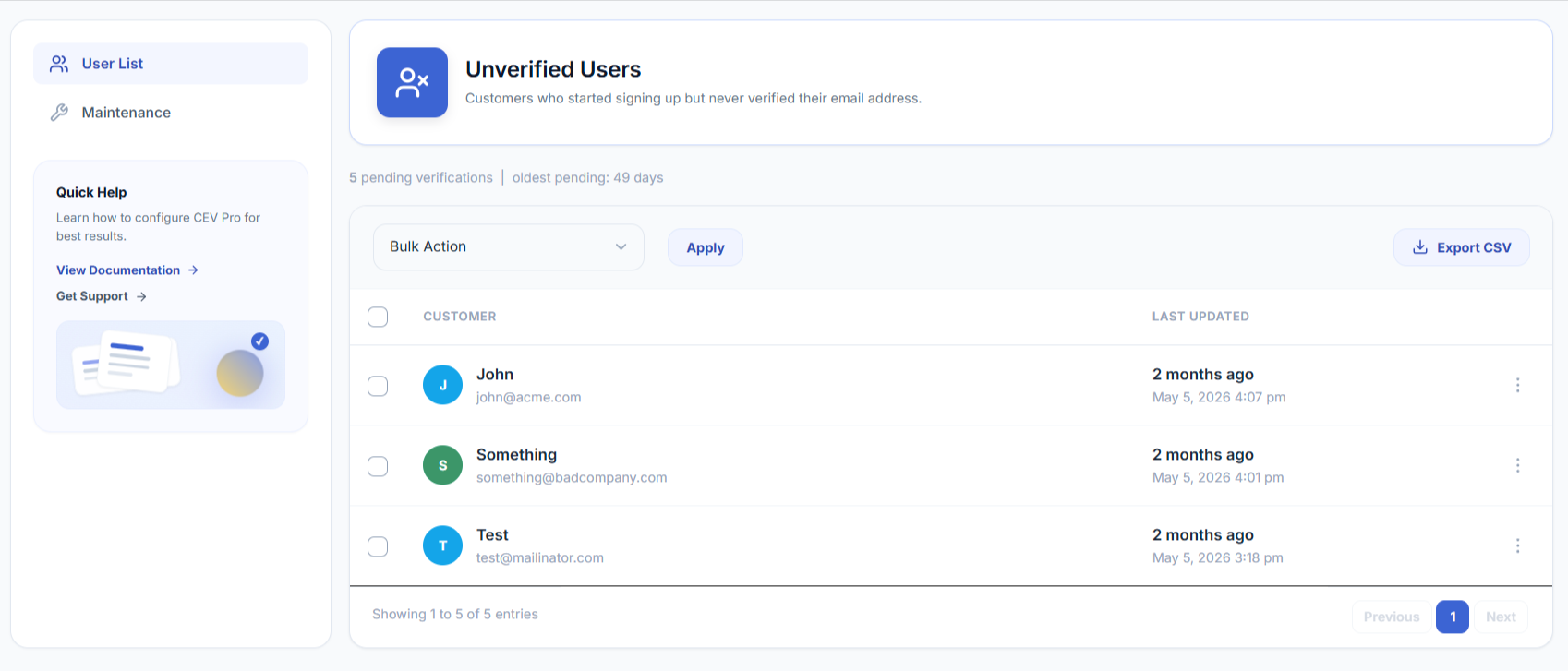
What Does the Risk Column Show?
The Risk column shows the score that AI risk scoring gave each pending sign-up when it was submitted — a single number from 0 to 100, colour-coded by the action that was taken:
| Chip | Meaning |
|---|---|
| Green | Low risk — the sign-up was allowed through with no extra friction |
| Amber | Medium risk — the sign-up was asked for a one-time code |
| Red | High risk — the sign-up was blocked |
| — (dash) | No score on record for this entry |
Hover the chip to see the reasons behind the score. The possible reasons are:
| Reason | What it means |
|---|---|
| Random-looking mailbox | The part before the @ looks machine-generated rather than human-chosen |
| Unusual domain | A non-mainstream domain whose name looks randomly generated or throwaway-shaped |
| Role / plus address | A role mailbox or plus-address pattern often used to farm multiple accounts |
| Many signups from one IP | Several different addresses were submitted from the same IP in a short period |
Note
Scores are recorded at the moment a sign-up is attempted, so the column only fills in for entries created while AI risk scoring was enabled. Rows added before you turned it on — and every row while the feature is off — show a dash. Turn it on under Settings → Spam Protection.
Use the Risk column to triage a spam burst: scan for the red and amber chips, tick those rows, and remove them with the Delete bulk action in one pass.
How to Send a Reminder Email to a Specific User?
- Go to Settings → Unverified Users → User List.
- Find the row for the customer.
- Click the kebab menu (⋮) at the right of the row.
- Click Send reminder. The customizer-defined re-engagement email is sent to that customer immediately.
Note
Sending a reminder this way is independent of the cron — you can send to any row, anytime, regardless of the configured intervals.
How to Send Reminders to Multiple Users at Once?
- Go to Settings → Unverified Users → User List.
- Tick the checkboxes next to the users you want to email.
- From the Bulk Action dropdown, choose Send re-engagement reminder.
- Click Apply.
- Confirm the send in the modal that appears.
Tick the checkbox in the column header to select every visible row at once.
How to Delete an Unverified User Entry?
- Go to Settings → Unverified Users → User List.
- Click the kebab menu (⋮) on the row.
- Click Delete and confirm.
For bulk delete: tick multiple rows, choose Delete from the Bulk Action dropdown, click Apply, and confirm.
How to Export the Unverified User List to CSV?
- Go to Settings → Unverified Users → User List.
- Click Export CSV in the top-right of the records card.
- The file downloads with columns: ID, Email, Status, Last Updated.
The export includes the entire list, not just the visible page.