Customise the subject, heading, and body of each return and exchange email from the WooCommerce email settings screen.
WooCommerce → Returns Center → Email NotificationsReturn Request Received (Customer) Email
Sent automatically when a customer submits a return request. Confirms the request was received and is under review.
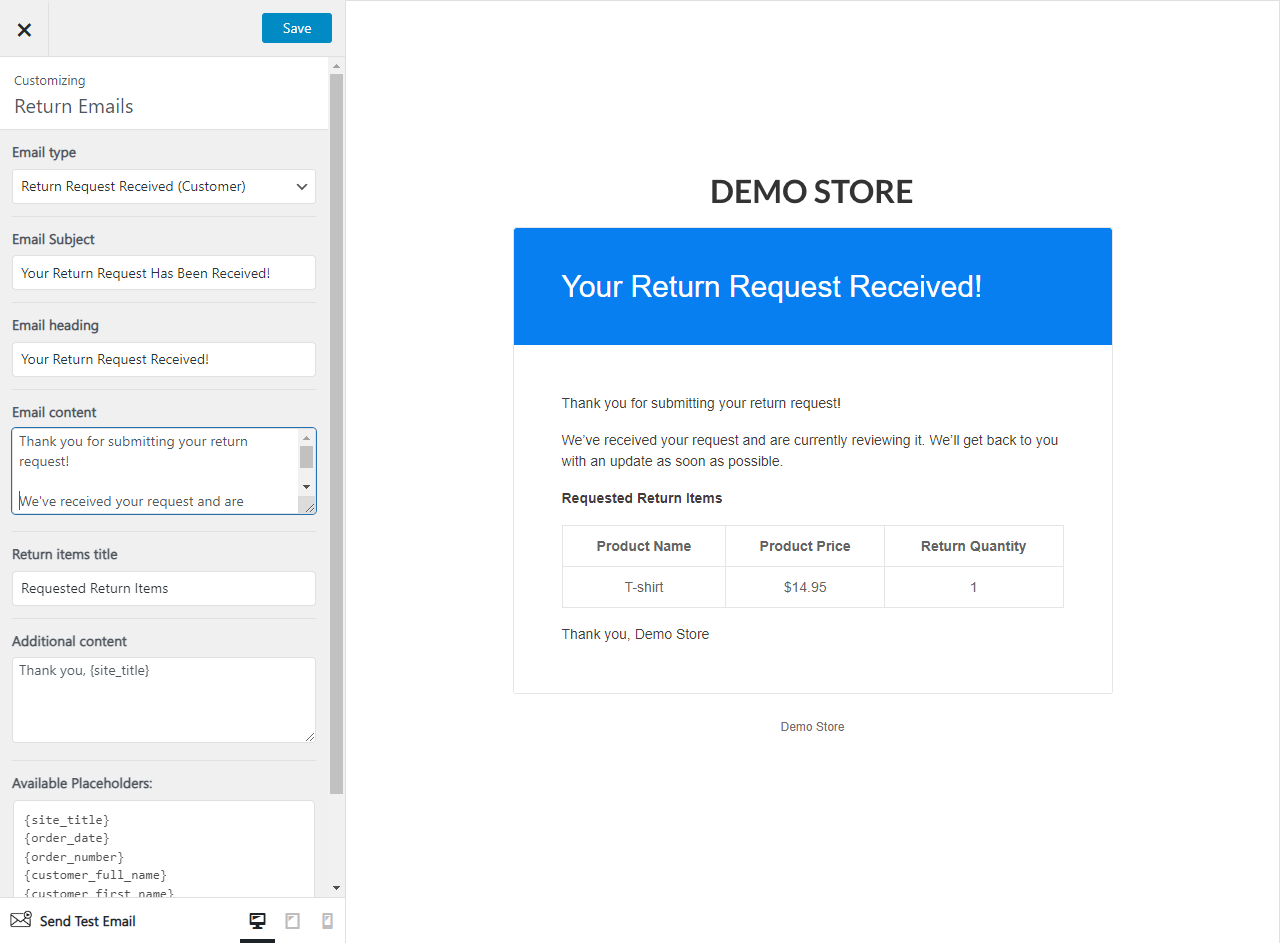
- Email Subject — Subject line of the email.
- Email Heading — Heading displayed at the top of the email body.
- Email content — Main body text of the email.
- Return Items Title — Heading above the list of returned items.
- Additional content — Optional text appended after the main content.
- Available variables —
{site_title}{order_date}{order_number}{customer_full_name}{customer_first_name}{customer_last_name}{customer_username}{store_address}{phone_number}
Return Approved (Customer) Email
Sent when an admin approves a return request. Includes approval details and any instructions for returning the item.
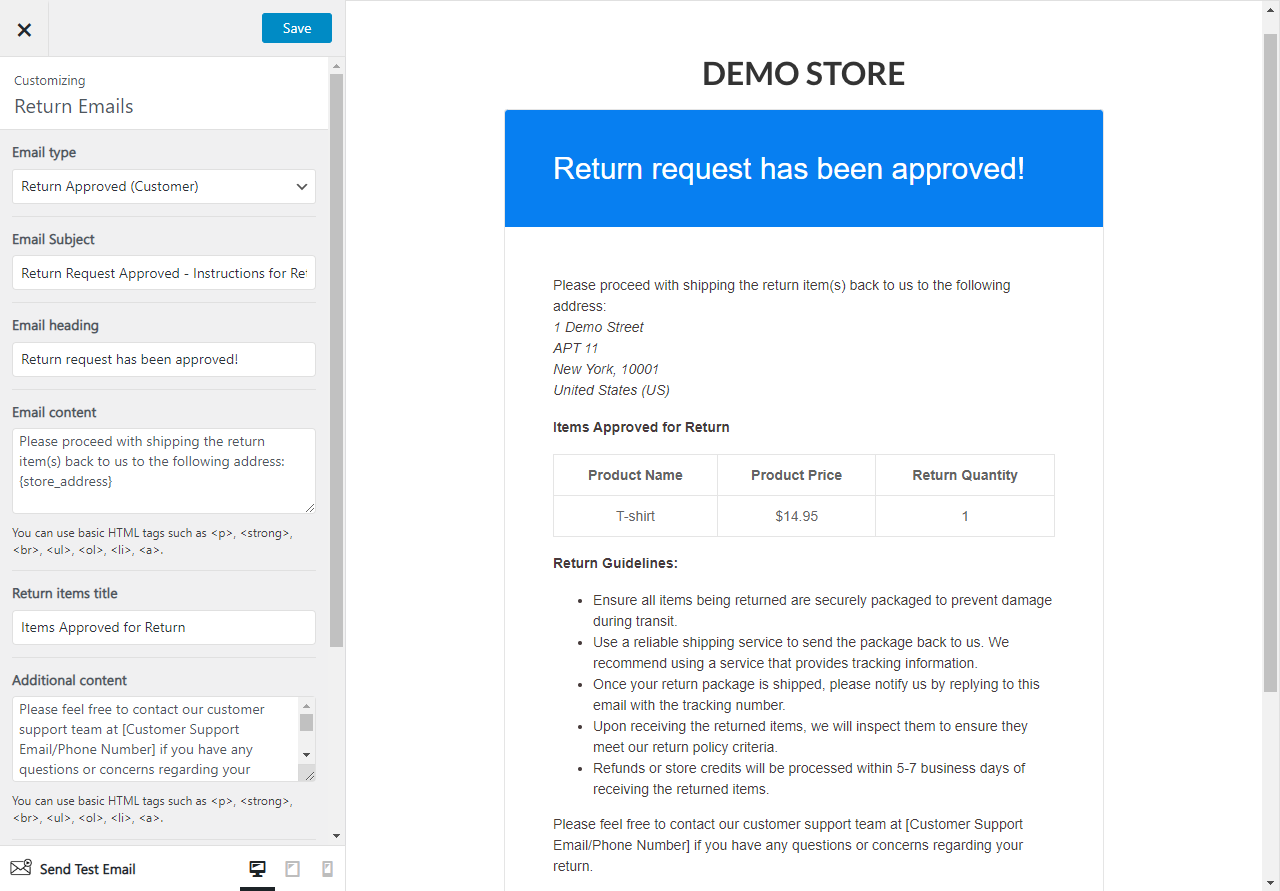
- Email Subject — Subject line of the email.
- Email Heading — Heading displayed at the top of the email body.
- Email content — Main body text of the email.
- Return Items Title — Heading above the list of returned items.
- Additional content — Optional text appended after the main content.
- Available variables —
{site_title}{order_date}{order_number}{customer_full_name}{customer_first_name}{customer_last_name}{customer_username}{store_address}{phone_number}
Return Rejected (Customer) Email
Sent when an admin rejects a return request. Typically explains the reason for rejection and any next steps.

- Email Subject — Subject line of the email.
- Email Heading — Heading displayed at the top of the email body.
- Email content — Main body text of the email.
- Return Items Title — Heading above the list of returned items.
- Additional content — Optional text appended after the main content.
- Available variables —
{site_title}{order_date}{order_number}{customer_full_name}{customer_first_name}{customer_last_name}{customer_username}{store_address}{phone_number}
Exchange Request Received (Customer) Email
Sent automatically when a customer submits an exchange request. Confirms the request was received and is under review.
- Email Subject — Subject line of the email.
- Email Heading — Heading displayed at the top of the email body.
- Email content — Main body text of the email.
- Exchange Items Title — Heading above the list of exchange items.
- Additional content — Optional text appended after the main content.
- Available variables —
{site_title}{order_date}{order_number}{customer_full_name}{customer_first_name}{customer_last_name}{customer_username}{store_address}{phone_number}
Exchange Approved (Customer) Email
Sent when an admin approves an exchange request. Includes approval details and instructions for the exchange.
- Email Subject — Subject line of the email.
- Email Heading — Heading displayed at the top of the email body.
- Email content — Main body text of the email.
- Exchange Items Title — Heading above the list of exchange items.
- Additional content — Optional text appended after the main content.
- Available variables —
{site_title}{order_date}{order_number}{customer_full_name}{customer_first_name}{customer_last_name}{customer_username}{store_address}{phone_number}
Exchange Rejected (Customer) Email
Sent when an admin rejects an exchange request. Typically explains the reason and any alternative steps.
- Email Subject — Subject line of the email.
- Email Heading — Heading displayed at the top of the email body.
- Email content — Main body text of the email.
- Exchange Items Title — Heading above the list of exchange items.
- Additional content — Optional text appended after the main content.
- Available variables —
{site_title}{order_date}{order_number}{customer_full_name}{customer_first_name}{customer_last_name}{customer_username}{store_address}{phone_number}
Next Steps
- SMS Notifications — add SMS alerts alongside these email notifications.
- Translation — translate email strings with Loco Translate or WPML.
- Modify Recipient Email (Developer) — route email notifications to different addresses per product or vendor.