Configure your return window, refund methods, exchange options, fraud prevention, and warranty workflow from the plugin settings page.
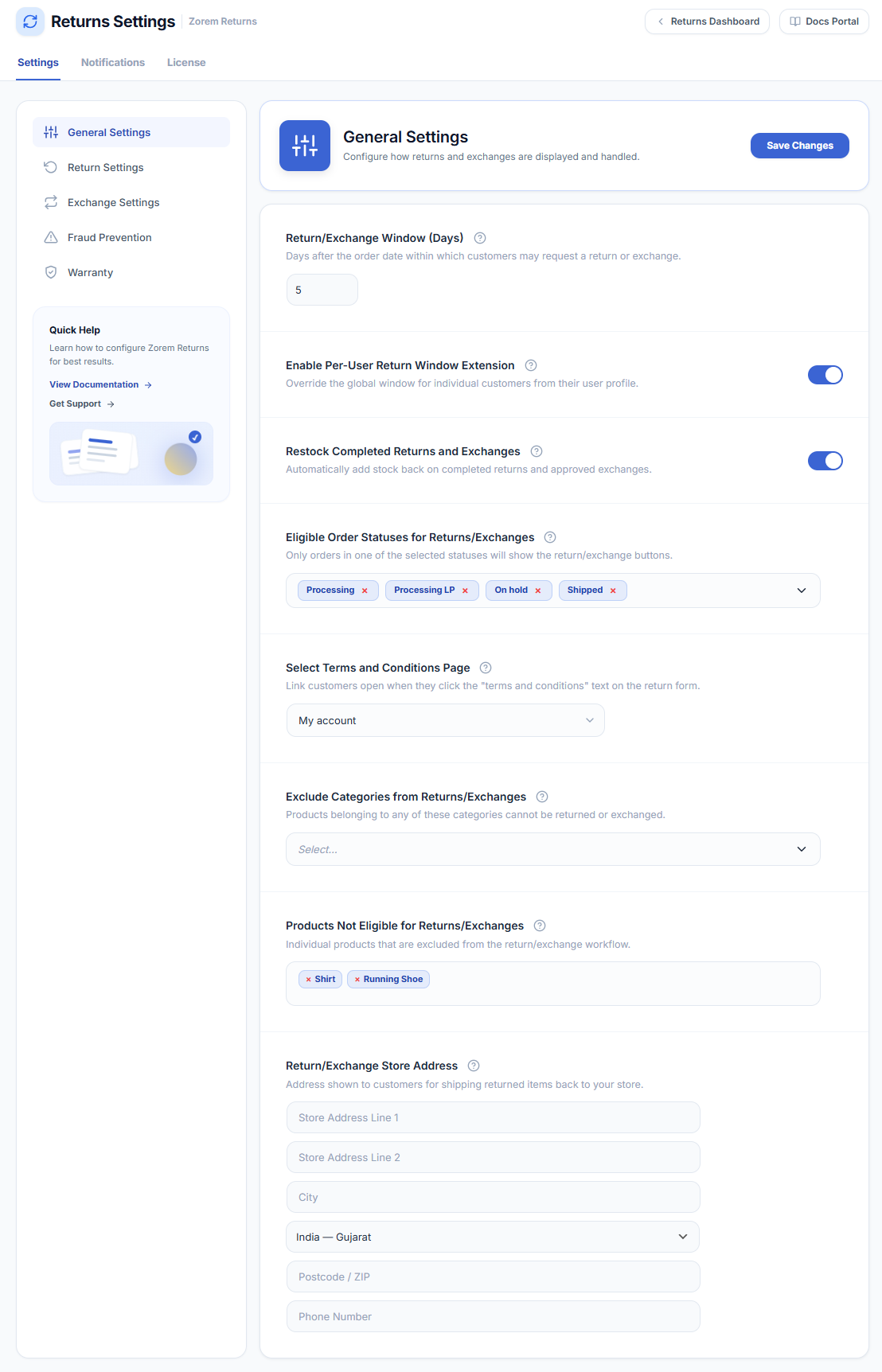
WooCommerce → Returns Center → SettingsGeneral Settings
- Return/Exchange window duration (days) — Number of days a customer has to submit a return or exchange after the order date. Default: 30.
- Enable Per-User Return Window Extension — When enabled, you can set a custom return/exchange window per customer from their user profile page. Default: off.
- Automatically Restock Approved Returns/Exchanges — Restocks items when a return or exchange request reaches Return Completed status. Note: items are restocked on Completed, not on Approved, to support a two-step review workflow. Default: off.
- Order statuses that are eligible for returns/exchanges — Select which order statuses allow a return or exchange request. Default: Completed.
- Select terms and conditions page — Optionally link a terms-and-conditions page; customers must accept it before submitting a request. Default: none.
- Categories not eligible for returns/exchanges — Products in these categories cannot be returned or exchanged.
- Products not eligible for returns/exchanges — Individual products excluded from returns and exchanges.
- Return/Exchange store address — Your return shipping address, shown to customers on the request confirmation screen.
Return Settings
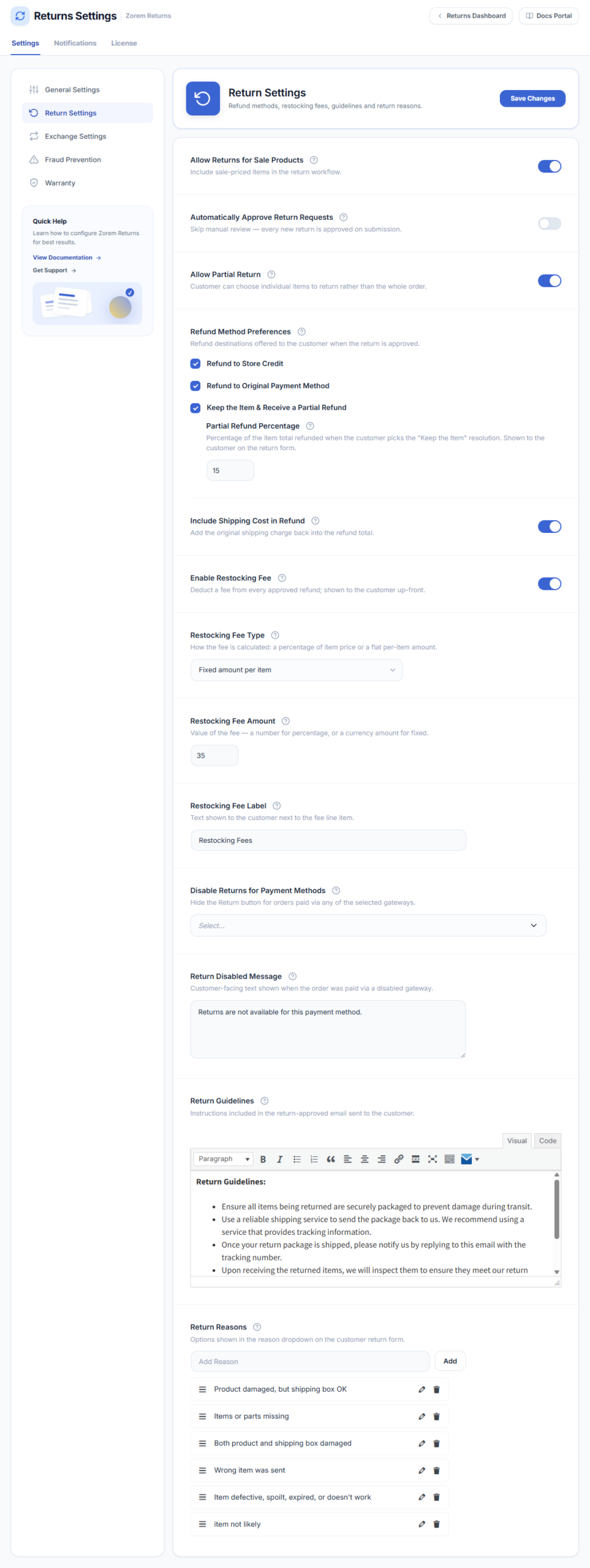
- Allow returns for sale products — When on, sale-priced items are eligible for returns. Default: off.
- Allow partial return — Customers can return individual items from a multi-item order rather than the whole order. Default: off.
- Auto-approve return requests — Requests are approved immediately on submission without admin review. Default: off.
- Refund method preferences — Choose which refund methods customers may select: Refund to original payment method, Store credit coupon, or both. Default: both enabled.
- Include the shipping fee in the refund amount — Add the order’s shipping cost to the calculated refund. Default: off.
- Enable Restocking Fee — Deduct a restocking fee from the refund. The fee is shown to the customer before they submit. Default: off.
- Restocking Fee Type — Percentage (of each item price) or Fixed (flat amount per item, multiplied by quantity).
- Restocking Fee Amount — For Percentage: enter the number (e.g. 15 for 15%). For Fixed: enter the amount in your store currency (e.g. 5 for $5 per item).
- Restocking Fee Label — Label shown to customers in the return summary, admin dashboard, and refund emails.
- Disable Returns for Payment Methods — Orders paid with selected gateways cannot be returned; the Start a Return button is hidden. Example: Cash on Delivery.
- Return Disabled Message — Message shown when a customer’s order uses a disabled payment method.
- Return guidelines — Instructions displayed to customers on the return request form.
- Add Reason for Return — Manage the list of return reasons customers can select.
Exchange Settings
- Enable Exchanges — Master switch for the exchange feature. Default: on.
- Allow exchanges for sale products — Sale-priced items are eligible for exchanges. Default: off.
- Auto-approve exchange requests — Requests are approved and a child order created immediately on submission. Default: off.
- Allow partial exchange — Customers can exchange individual items from a multi-item order. Default: off.
- Allow Cross-Product Exchange — Customers can exchange for any product in the catalog, not just the same product’s variations. Default: off.
- When new item costs more — Choose what happens if the replacement product is more expensive: Charge the difference or Allow free upgrade.
- When new item costs less — Choose what happens if the replacement is cheaper: Issue store credit for the difference or No refund.
- Store credit coupon expiry (days) — Days until a store-credit coupon from an exchange difference expires. Enter 0 for no expiry.
- Preset Shipping Method for Exchange Orders — Shipping method automatically applied to exchange child orders. If none is selected, WooCommerce’s default shipping method is used.
- Disable Exchanges for Payment Methods — Orders paid with selected gateways cannot be exchanged; the Exchange button is hidden.
- Exchange Disabled Message — Message shown when a customer’s order uses a disabled payment method.
- Exchange guidelines — Instructions displayed to customers on the exchange request form.
- Add Reason for Exchange — Manage the list of exchange reasons customers can select.

Fraud Prevention
- Enable Fraud Prevention — Master switch for per-customer return limits and the customer blocklist. Default: off.
- Enable Per-Customer Return Limit — Limits how many returns a customer can submit in a rolling time window. Default: off.
- Maximum Returns per Customer — Maximum number of return requests allowed per customer within the time window.
- Time Window (Days) — Rolling window in days for counting recent returns (e.g. 90 = the last 90 days).
- Limit-Reached Message — Message shown when a customer exceeds the limit. Supports placeholders for the maximum count and time window.
- Email Admin When Limit Is Hit — Sends a notification when a customer hits the limit. Throttled to one email per customer per day.
- Admin Notification Email — Email address for limit-reached notifications. Blank = WordPress site admin email.
- Customer Blocklist — One entry per line: customer email addresses or numeric user IDs. Blocked customers cannot submit return requests.
- Bulk Upload to Blocklist — Upload a CSV or TXT file (one email or user ID per line) to merge into the blocklist.
- Silently Hide Return Button — When on, blocked customers and customers over the limit see no button and no message. Default: off (message is shown).
- Blocklist Message — Message shown to customers on the blocklist.
- Check Customer Return Count — Diagnostic tool: enter an email or user ID to see that customer’s counted total and blocklist status.
Warranty
- Enable Warranty Workflow — Shows a Submit Warranty Claim button on eligible orders after the return window expires, while the product is still under warranty. Default: off.
- Default Warranty Period (Days) — Default warranty length applied when a product or category does not set its own. Enter 0 for no warranty by default.
- Warranty Reasons — List of reasons a customer can choose when filing a warranty claim.
Next Steps
- Email Notifications — customise the email templates customers and admins receive at each status change.
- How to Use the Returns & Exchanges Center — manage requests from the admin dashboard.
- Customer View — see what customers experience when submitting a return or exchange.