To turn on the AI Assistant, go to your WordPress admin menu:
WooCommerce > Returns & Exchanges Center > AI Assistant (tab in the header) > AI Settings.
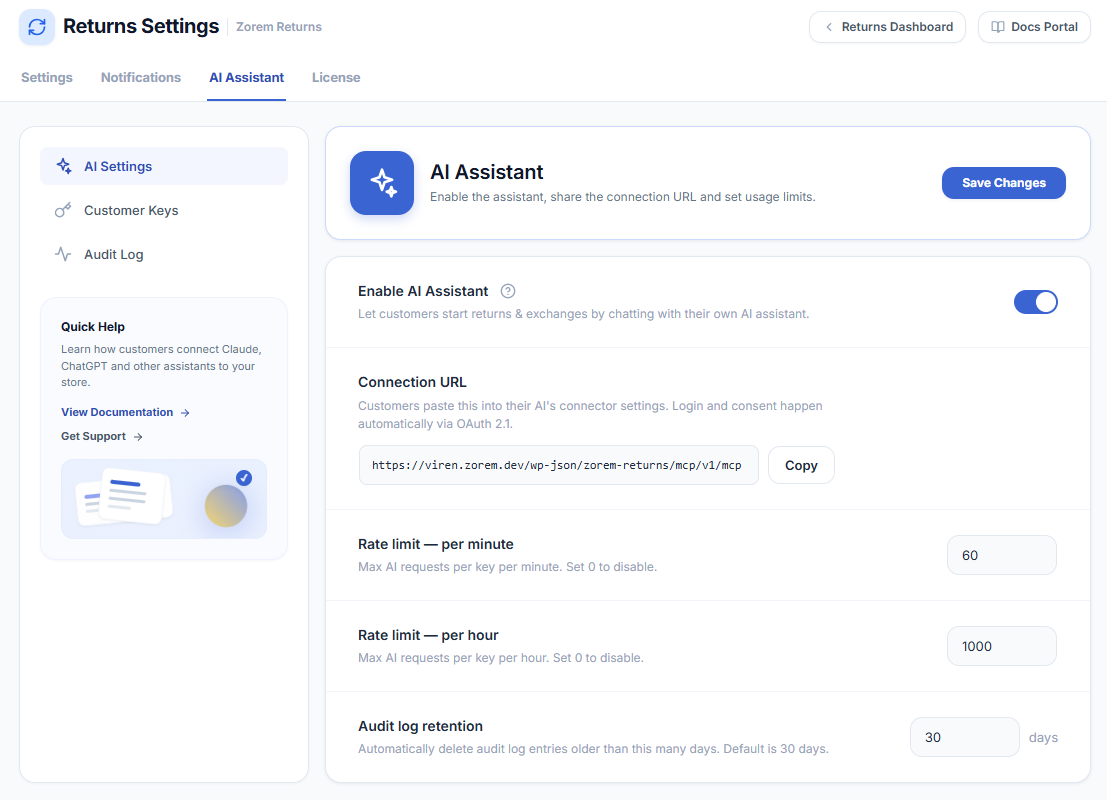
Settings explained
- Enable AI Assistant — the master switch. When off, the connection endpoint is closed and no AI can connect. Turn it on and click Save Changes.
- Connection URL — the address customers paste into their AI assistant’s connector settings. Login and consent happen automatically via OAuth 2.1. Use the Copy button to copy it.
- Rate limit — per minute — the maximum number of AI requests allowed per key, per minute. Default is 60. Set to 0 to disable the per-minute limit.
- Rate limit — per hour — the maximum number of AI requests allowed per key, per hour. Default is 1000. Set to 0 to disable the per-hour limit.
- Audit log retention — how many days of activity history to keep. Older entries are deleted automatically once a day. Default is 30 days. Set to 0 to keep everything.
After changing any setting, click Save Changes at the top right of the panel.
Important: enabling and saving
The toggle alone does not take effect until you click Save Changes. If an AI assistant reports a connection error, the most common cause is that the assistant is switched off (or was never saved). Confirm the toggle is on, save, and try connecting again.