Payment gateway restrictions show or hide individual payment methods at checkout based on the customer’s billing or shipping country. Use them when a payment provider only serves certain countries, or when you want to steer customers in specific countries to specific payment methods.
WooCommerce → Country Restrictions → Payment RestrictionsHow to Create a Payment Restriction Rule
- Click Add New Restriction Rule — on the Payment Restrictions tab.
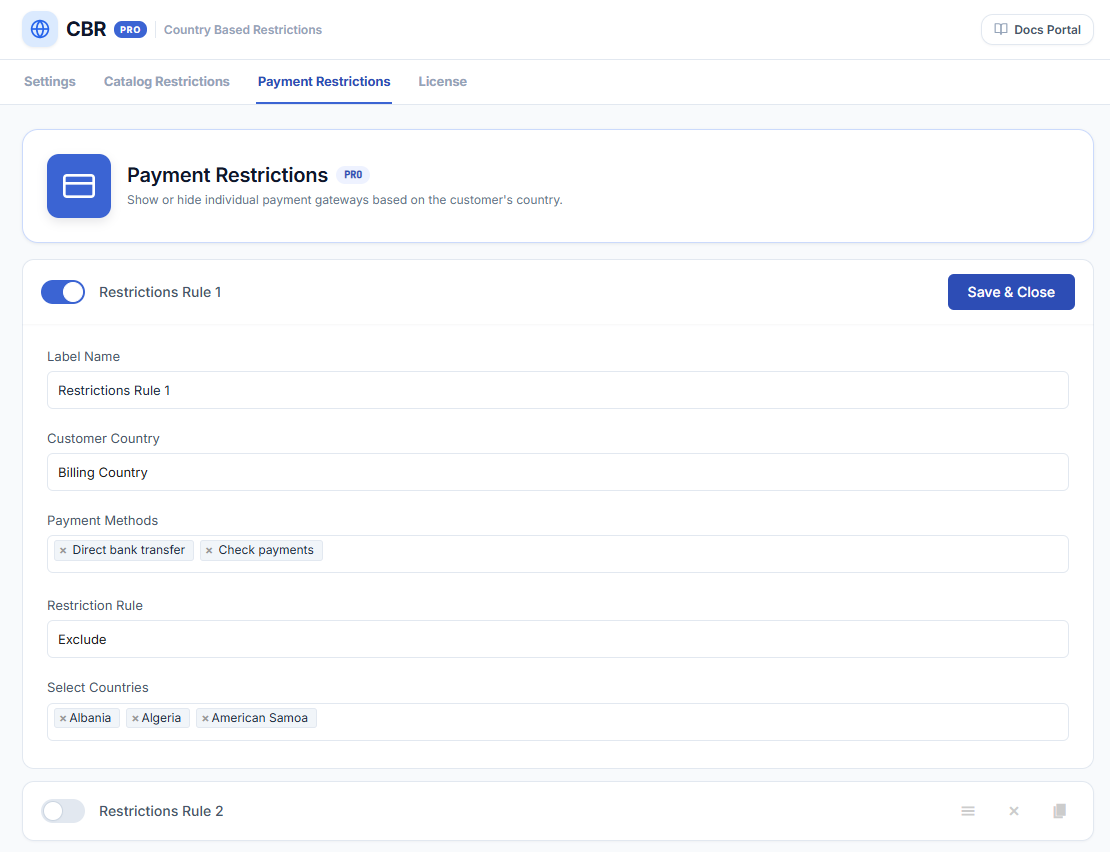
- Label Name — a name for the rule, shown only to admins.
- Customer Country (default: Billing Country) — whether this rule checks the customer’s billing or shipping country. This is set per rule and is independent of the global Restriction by country setting.
- Payment Methods — the payment gateways the rule applies to. Every gateway installed on your store is listed — including WooPayments, Stripe, PayPal, cash on delivery, and any other installed gateway. A green status marks gateways enabled in your WooCommerce settings; grey marks disabled ones.
- Restriction Rule (default: Include) — Include: the selected payment methods are available only in the selected countries. Exclude: the selected payment methods are hidden in the selected countries and available everywhere else.
- Select Countries — the countries for the rule; multiple countries can be selected.
- Click Save & Close — to save the rule.
How It Behaves at Checkout
- Rules apply on both the classic checkout and the block checkout (Checkout block). The available payment methods update when the customer changes their billing or shipping address at checkout.
- For guests who haven’t entered an address yet, the rule is evaluated against the detected country — see How CBR PRO Detects the Customer’s Country. Once an address is entered, the entered country decides.
- Payment restrictions only hide payment methods — they don’t restrict the products themselves. To block the purchase entirely, use product or catalog restrictions.
IMPORTANT
If your rules leave no payment method available for a customer’s country, WooCommerce shows its standard notice that no payment methods are available, and the customer cannot complete checkout. Double-check your Include rules: an Include rule limits the selected gateways to the selected countries, so customers in every other country lose those gateways.
Next Steps
- Setup & Configuration — product visibility modes and restriction messages.
- How CBR PRO Detects the Customer’s Country — detection sources and precedence.
- How to Set Up Bulk Catalog Restrictions — restrict whole product groups by country.