The Conversations tab shows what shoppers ask the chat, so you can improve your pages and catalogue. It fills up only while Save conversations is on.
AI Shopping Assistant → Conversations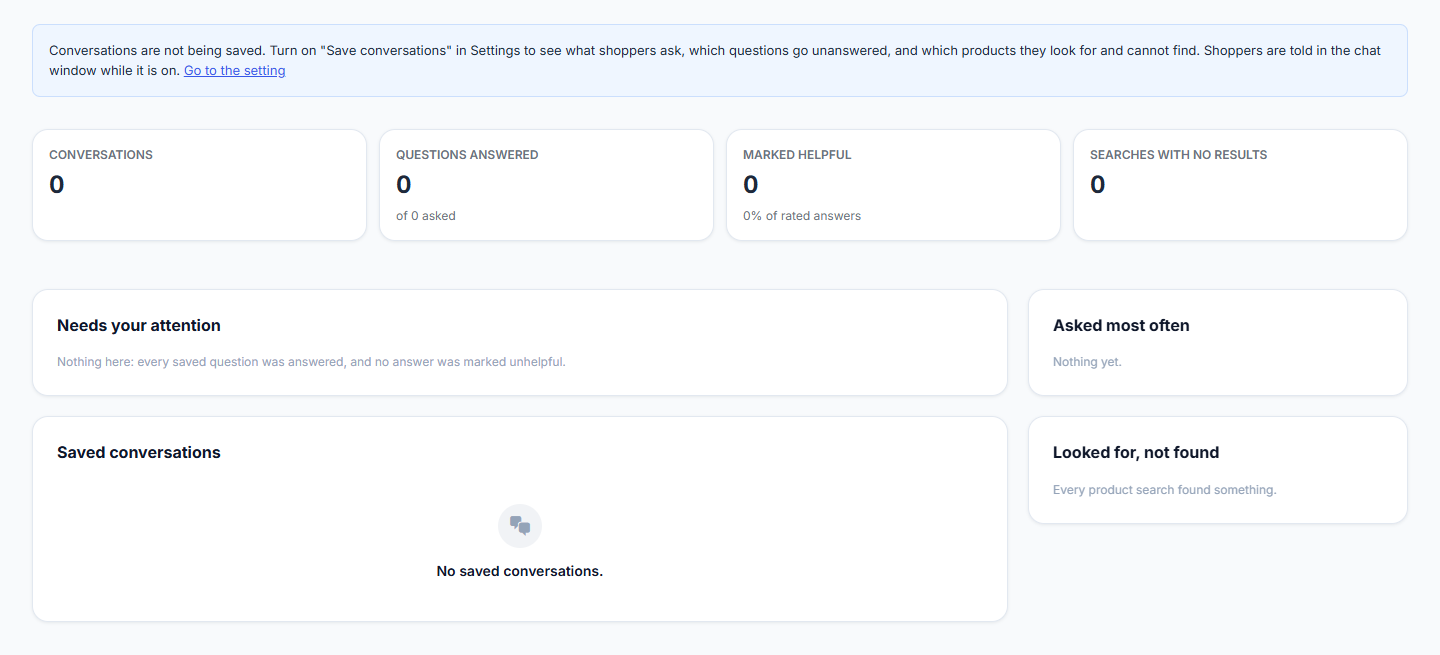
Saving is off by default. Turn it on under Settings → Saved conversations. Shoppers are told in the chat while it is on, and email addresses are removed from what is saved.
What You See
| Card | What it shows |
|---|---|
| Last 30 days | Conversations, questions answered, how often answers were marked helpful, and searches with no results. |
| Needs your attention | Questions the chat could not answer and answers marked not helpful, each with a link to the full conversation. |
| Asked most often | The most common questions. |
| Looked for, not found | Product searches that found nothing: products to stock, or words to add to your product listings. |
| Saved conversations | Every saved conversation. Open one to read the whole transcript. |
Delete Conversations
- One conversation — open it and click Delete.
- All of them — click Delete all on the Saved conversations card, or under Settings → Saved conversations.
- Automatically — conversations older than the Keep for days are deleted every day.
Deleting cannot be undone. A logged-in customer’s saved questions are also removed when you erase their personal data with WordPress’s privacy tools.
Without an active license this tab is hidden, nothing new is saved, and the daily delete pauses as well — so everything already saved is kept exactly as it is until the license is active again.