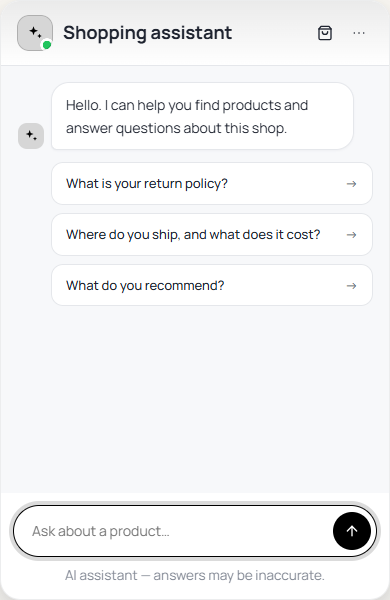
This is what a shopper sees and can do once the chat is on.
Products and the Basket
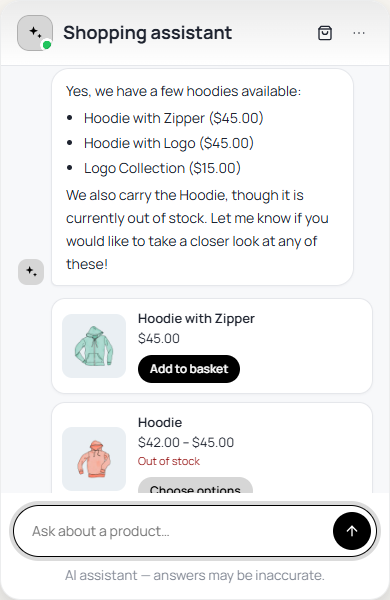
- Product cards — when a reply names products, a card appears for each (up to four) with its picture, price, sale price and stock.
- Add to basket — adds a simple product in stock straight from the card. A product with options shows Choose options instead.
- Change the basket — shoppers can ask for a different quantity, or to take something out, without leaving the chat.
- The basket updates itself — the theme’s mini-cart and basket count refresh without reloading the page, with a View basket link.
- On to checkout — when a shopper is ready, the chat hands them to your own checkout with their basket already built.
- Better search — matches product names, categories, tags and SKUs, and corrects small typos such as “hoddie”.
Discount Codes
A shopper who already has a code can ask the chat to apply it, and WooCommerce decides whether it is valid, exactly as it would on the basket page.
Questions About the Page
The chat knows which product, category or search page the shopper is on, and what is in their basket. On a product page, “is this one waterproof?” is about that product; on a category page, “which of these is cheapest?” is about that category.
Order Questions
A logged-in customer can ask about their own orders and is told the status, dates, total and tracking — one order by its number, or their five most recent. A guest is shown no order information and is asked to log in, with a Log in button. The chat never asks for an email address to look up an order.
Other Things in the Chat

| Feature | What the shopper sees |
|---|---|
| Conversation kept | The conversation, product cards included, stays when the shopper moves to another page. |
| Restart | In the chat menu: starts a new conversation. |
| Formatting | Bold text, lists, and links to pages on your own shop. Links to other sites are shown as plain text. |
| Helpful / Not helpful | Thumbs under each answer, while you save conversations. |
| Talk to a person | Email, WhatsApp and contact page buttons, when you set them up. |
| Returns & exchanges | A returns form, with Returns for WooCommerce. |