The Country Detection widget displays the detected country to your customers and lets them change it while browsing your store. When a visitor picks a country, it is stored in a cookie named country (30 days by default) and overrides IP geolocation — see How CBR PRO Detects the Customer’s Country.
Add the Widget to Your Store
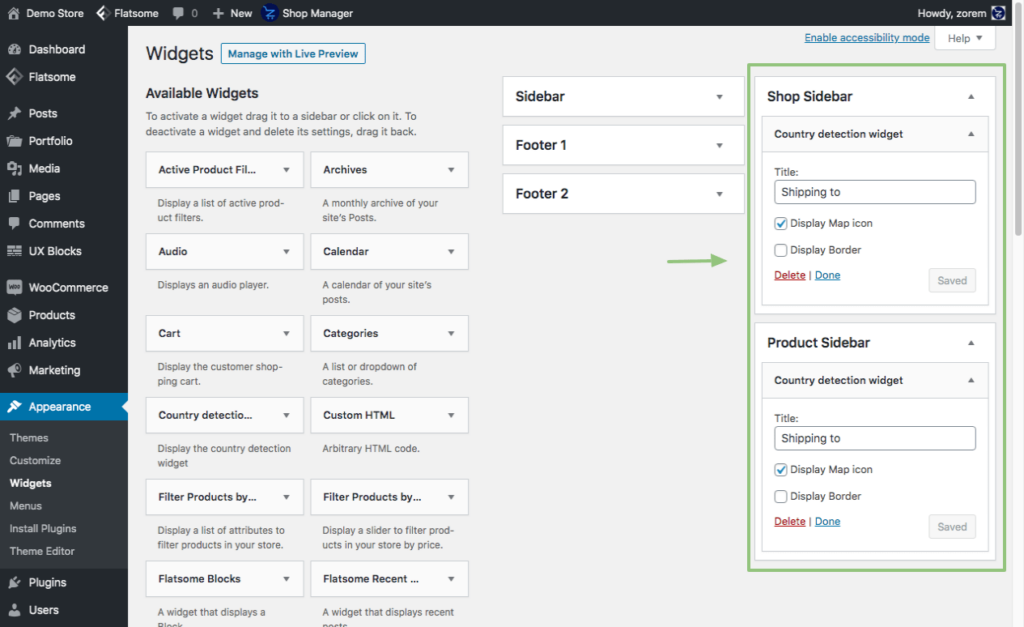
Appearance → Widgets → Country Detection widgetAdd the Country Detection widget to the product and shop sidebar widget areas, or to any other widget area of your theme.
IMPORTANT
Block themes (Full Site Editing themes such as Twenty Twenty-Four) have no Appearance → Widgets screen. On a block theme, use the [cbr_location_widget] shortcode in a Shortcode block instead — anywhere in a template, template part, or page. See How to Use the Country Detection Shortcode.
Widget options (all optional):
- Title (default: empty) — the label text shown before the detected country.
- Display Map icon (default: off) — show the country flag icon next to the country name.
- Display Border (default: off) — add a border around the widget.
Customize the Widget Popup
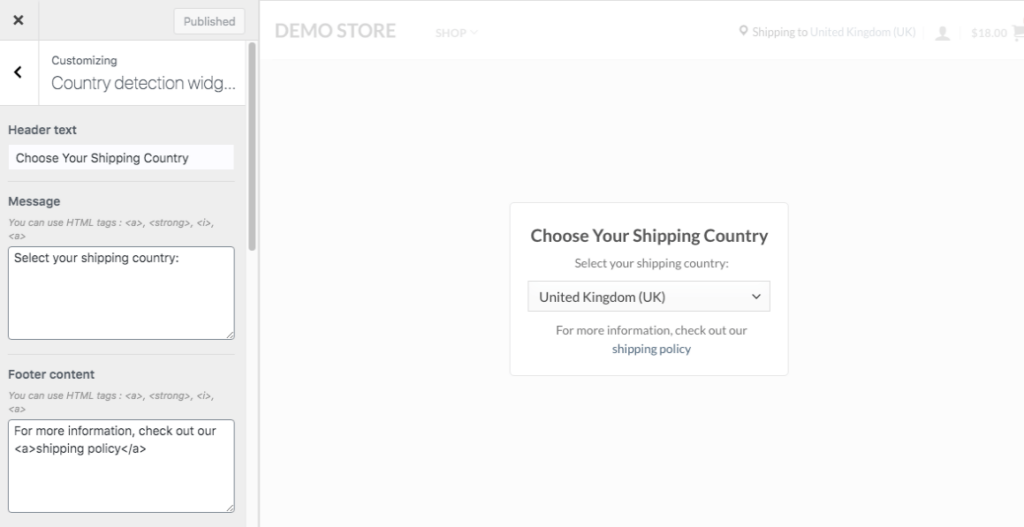
When a customer clicks the country in the widget, a popup opens where they select their country. You can customize the popup’s content and design with a live preview:
WooCommerce → Country Restrictions → Settings → Country Detection Widget → Customize the country detection widgetContent options:
- Header text (default: “Choose Shipping Country”)
- Message — text before the country selection dropdown.
- Footer Content — text after the country selection dropdown.
Design options:
- Width
- Padding
- Alignment
- Overlay Background Color
- Overlay Opacity
- Background Color
- Border Color
- Border Radius
Widget and Page Caching
INFO
The widget depends on the country cookie, so full-page caching can serve one visitor’s country to everyone. Since version 4.3.6, CBR PRO automatically sends no-cache headers on requests with a country cookie, an active Country Detection widget, or a page containing the widget shortcodes — honored by WP Super Cache, W3 Total Cache, WP Rocket, WP Fastest Cache, LiteSpeed Cache, and most host caches. If countries still appear wrong on cached pages, see the Compatibility guides.
Next Steps
- How to Use the Country Detection Shortcode — place the selector anywhere, including block themes.
- How CBR PRO Detects the Customer’s Country — the country cookie and detection precedence.
- Compatibility — caching plugins.