AI Agent OS can hide customer details from any agent that does not need them. When masking is on, customer names, emails, phone numbers and addresses are replaced with [masked] in everything the agent receives. The tools keep working — the agent just never sees who the customer is.
AI Agent OS → Agents → Configure → Connection → AccessCan This Agent See Customer Data?
The Customer data tag on the Agents list and on the agent’s page answers that question, from the agent’s permissions and its masking switch together:
| Tag | Meaning |
|---|---|
| No access | None of the agent’s tools can return a customer record. |
| Masked | Some of its tools return customer records, and masking replaces the personal details. |
| Visible | Some of its tools return customer records, and the agent sees the real details. |
How to Turn Masking On or Off
- Open the agent and go to its Connection section.
- In the Access card, switch Mask customer personal data on or off.
- Click Save changes at the top of the section.
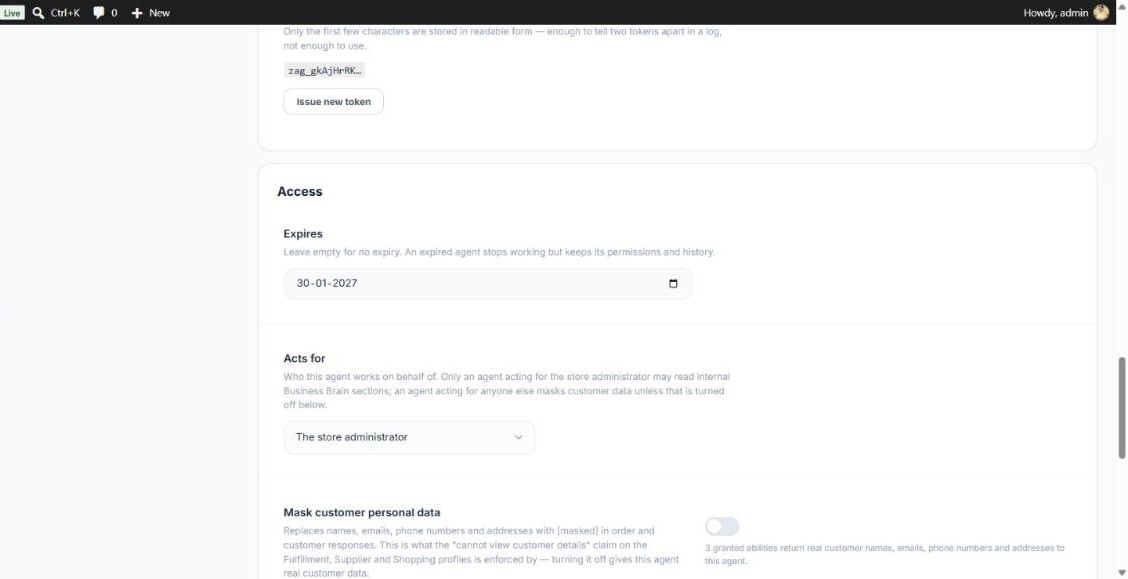
The line beside the switch tells you how many of the agent’s tools return customer data. The change applies from the agent’s very next call, on MCP and on the WooCommerce API. Reload the page to see the updated tag.
The Default
Masking is on by default for any agent that does not act for the store administrator — agents acting for a partner and shopper-facing agents. The Fulfillment, Supplier, Shopping and Support profiles all start masked. An agent you create with No profile acts for the administrator and starts unmasked, so turn masking on if the agent is for anyone outside your team.
Other Privacy Protections
- Customer searches are blocked for masked agents — email and phone search terms are removed from what a masked agent sends. A tool that only uses an email to check something, such as an order looked up by its number and the customer’s own email, keeps it, and its reply is still masked.
- The Activity Log is cleaned before saving — passwords, keys and personal details are removed from stored rows.
- Agents cannot sign in to WordPress — each agent works through a hidden account that can only reach its MCP address and the WooCommerce API.
- No data leaves your site by default — there is no tracking and no call to a Zorem server.
The approval screen shown when an app connects also tells you, for each agent, whether it can see customer details.