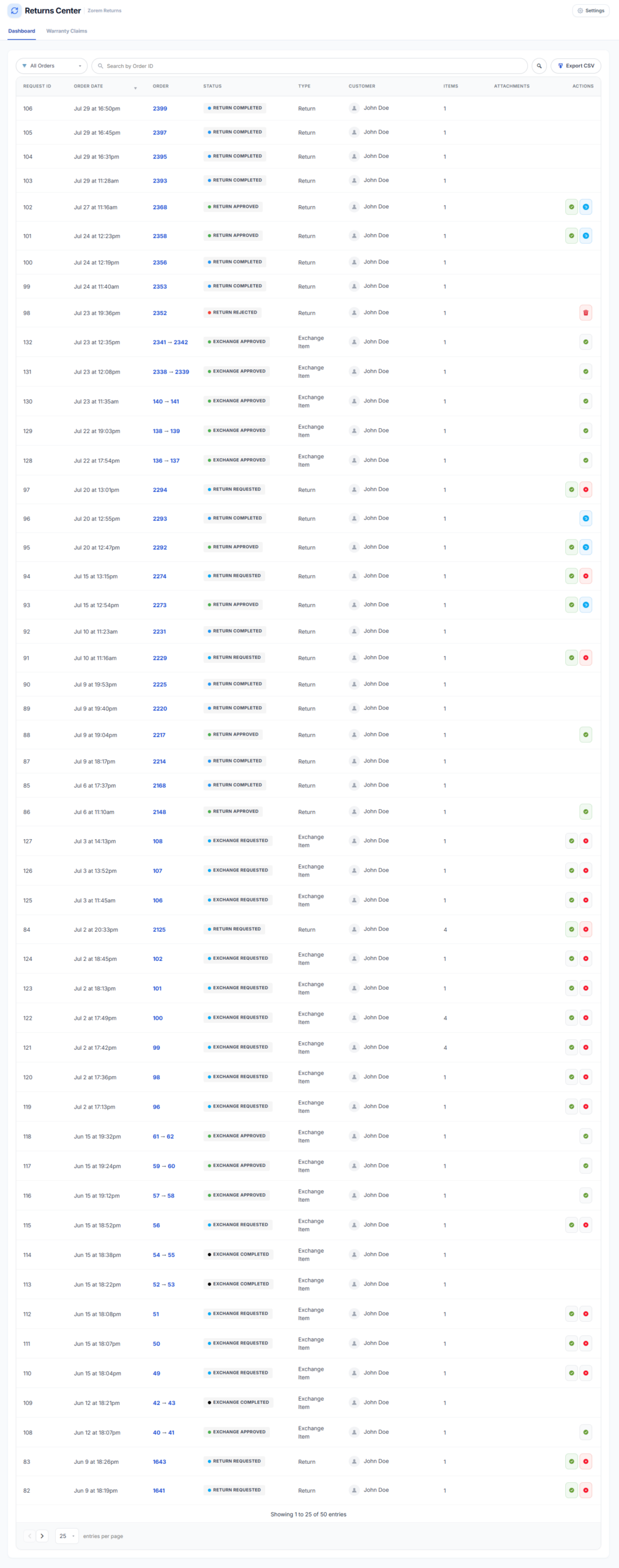
The Returns & Exchanges Center gives you a centralized dashboard to view, filter, approve, reject, and delete return and exchange requests — without leaving WooCommerce.
WooCommerce → Returns CenterRequest Statuses
- Return Requested — the customer submitted a return request. A notification email is sent to the customer and admin.
- Return Approved — the admin approved the return. A notification email is sent to the customer.
- Return Rejected — the admin rejected the return. A notification email is sent to the customer.
- Return Cancelled — the customer cancelled their request. A notification email is sent to the admin.
- Return Completed — the admin marked the return as complete (refund processed). Items are restocked at this step if Automatically Restock is enabled.
- Exchange Requested — the customer submitted an exchange request. A notification email is sent to the customer and admin.
- Exchange Approved — the admin approved the exchange; a child order is created for the replacement item. A notification email is sent to the customer.
- Exchange Rejected — the admin rejected the exchange. A notification email is sent to the customer.
- Exchange Cancelled — the customer cancelled their exchange request. A notification email is sent to the admin.
- Exchange Completed — the admin marked the exchange as complete.
Dashboard Quick Actions
From the Returns Center dashboard, use the quick action buttons on each row to approve, reject, or permanently delete a request. Admins can permanently delete unapproved or cancelled requests from the database.
Return & Exchange Items Panel (Order Edit Page)
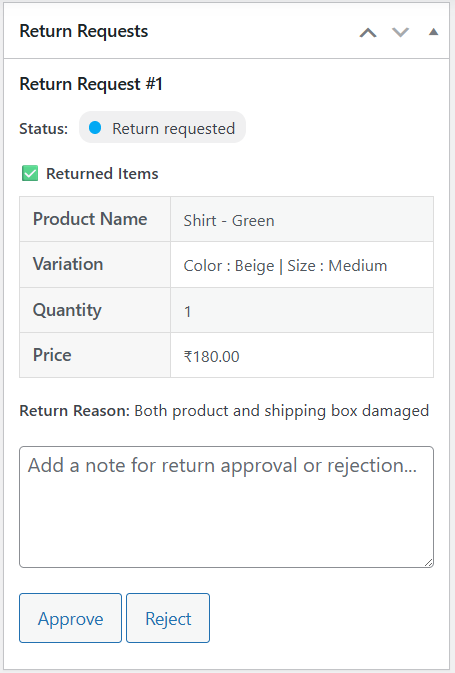
A Return Requests metabox appears in the sidebar of the order edit screen for every order that has a return or exchange request. It shows all request details and lets you approve or reject directly from the order.
WooCommerce → Orders → [Order] → Return Requests (sidebar panel)- Return and Exchange Item Details — product name, quantity, price, and reason for each item in the request.
- Quick Actions — approve or reject the request directly from the order edit page.

Order Status Changes
- Return order status — set when all eligible items in an order have been returned and all return requests (full or partial) have been approved.
- Partial Return order status — set when a single eligible item has been returned and its return request (partial or complete) has been approved.
Next Steps
- Returns Analytics Dashboard — track return rates, revenue impact, and top-returned products.
- Customer View — see what customers experience when submitting and tracking requests.
- Email Notifications — customise the emails sent at each status change.