Country Based Restrictions for WooCommerce (CBR) is fully compatible with WPML, allowing you to translate all CBR strings into your desired languages — individually or in bulk.
Bulk Translation via WPML Translation Dashboard
To translate multiple CBR strings at once:
- Log in to your WordPress dashboard.
- Navigate to WPML → Translation Dashboard.
- Scroll down to the Other texts (Strings) section.
- In the Domains filter, search for CBR strings such as:
- admin_texts_wpcbr_default_message
- admin_texts_wpcbr_cart_message
- admin_texts_cbr_cat_default_message
- Once the relevant strings are displayed, select the checkboxes for all strings you want to translate and click Translate your content.
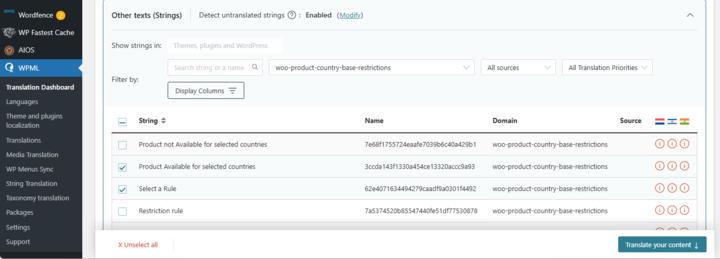
- At Step 2, choose your translation method. To quickly translate multiple strings, choose Translate automatically from the dropdown. For the best results, ensure your translation engine is Private Translation Cloud (PTC), WPML’s proprietary AI. If you want to translate strings yourself, choose Translate myself.
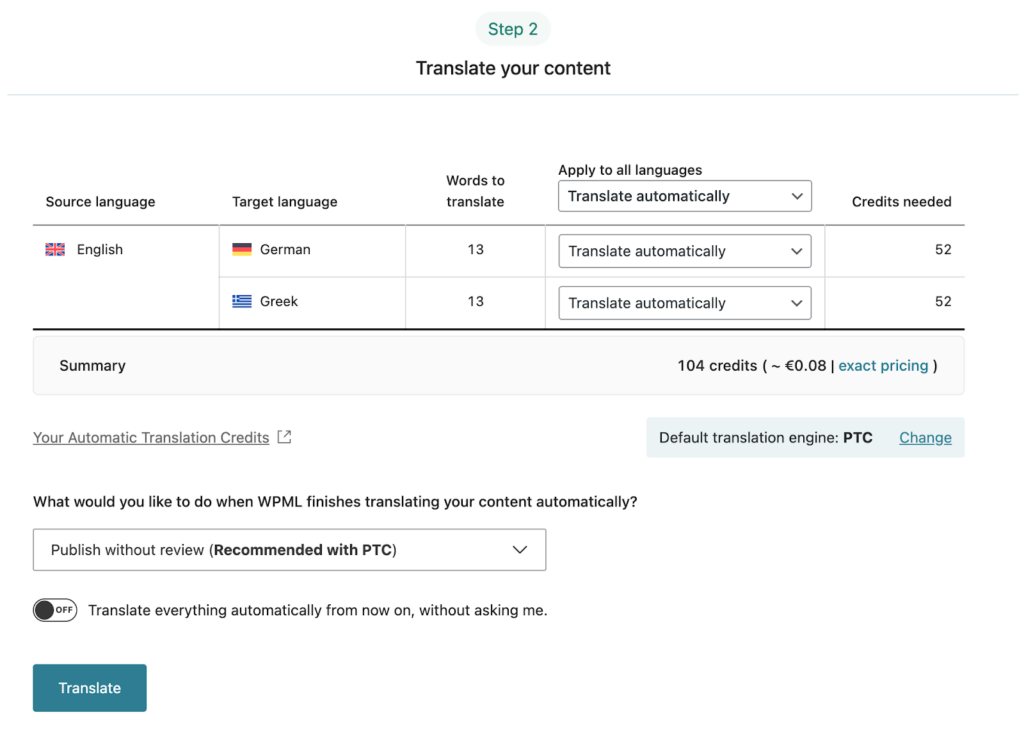
- When ready, click Translate. With automatic translation, PTC translates your selected strings in a few minutes. If you chose to translate yourself, navigate to WPML → Translations to add your translations for each string.
Sync Your Translations
Once translated, ensure the strings are synced across your site. If you published without review, WPML applies translations automatically. Otherwise, go to WPML → Translations to review and publish translated content.